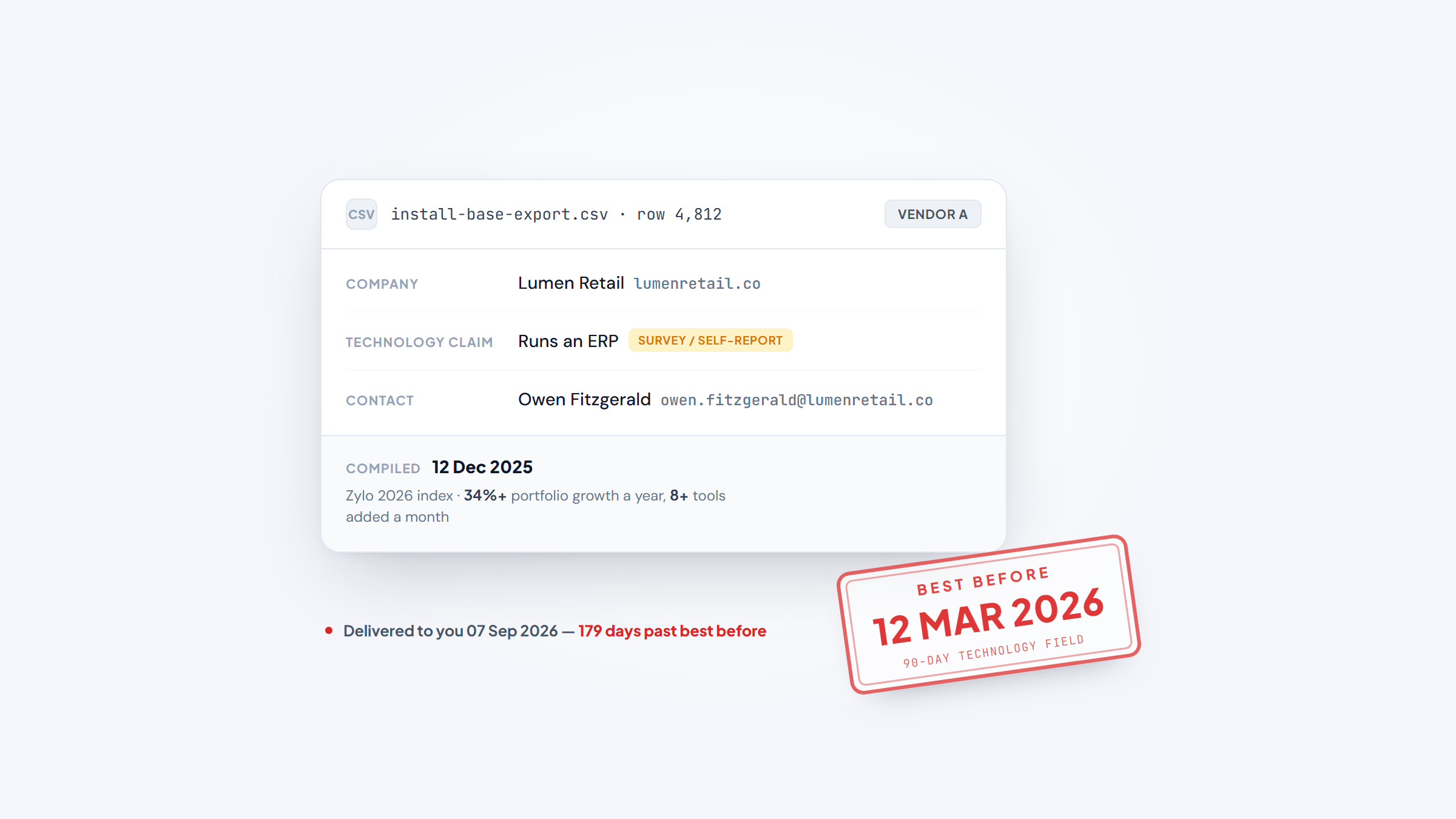
- 1A technology users email list is a bet that a company still runs the software it ran when the file was compiled. Zylo's 2026 index puts stack growth at over 34% a year, so that bet expires fast.
- 2Two respected measurements of how many apps a company runs disagree by three times, 101 versus 305, because they count different things. Any vendor quoting a precise install-base figure is quoting one methodology and calling it fact.
- 3You can detect a company's public web stack yourself for nothing. BuiltWith is free for individual site lookups and Wappalyzer gives you 50 a month.
- 4Detection tells you which company to approach, never which person. Closing that last step is what our free Gmail extension does, and it is not a data file.
Technographic targeting is the most persuasive idea in outbound: instead of guessing who needs your integration, sell to the companies already running the thing you integrate with.
The idea is sound. The product built on top of it, a bought file of "technology users," is where it usually falls apart, because software stacks move and files do not.
This guide covers what technographic data actually is, how detection works, how quickly it goes stale, what the self-serve tools cost against what the list vendors charge, and how to compare technology users email list vendors on the only metric that matters. Name2Email is ours: a no-cost Gmail add-on that works out someone's address from their name and company domain. That puts us at the end of this process rather than the start of it.
What These Lists Are Actually Selling
A technographic record is a claim with three parts: this company exists, it uses this technology, and here is somebody who works there.
The first part is easy and nearly free. The third part is ordinary contact data, no different from any other B2B file. The middle part is the whole product, and it is the part that is hardest to keep true.
Vendors package this as an "install base" or "installed technology" file, and the segmentation options tell you what they can actually see: CRM users, ERP users, cloud platform users, marketing automation users, ecommerce platform users. Notice that these are all categories where the software leaves a public trace.
Where a technology leaves no public trace, the data gets much softer. A company's payroll system, its internal ticketing tool, or its data warehouse are rarely visible from outside, and records claiming them are usually inferred from job postings, press releases, or a survey rather than observed.
How Anyone Knows What Software a Company Runs
There are four detection methods behind essentially every technographic dataset, and they differ enormously in reliability.
Page-source detection is the strongest. When a site loads a script, a tracking pixel, a chat widget, or a checkout, the technology's own code appears in the page. This is directly observable, machine-verifiable at scale, and re-checkable any time. It is also limited to things that run in a browser.
DNS and mail-record detection reads what a domain publishes about itself. An MX record pointing at Google means the company runs Google Workspace, and an SPF record naming a sending platform reveals the email tool. Also directly observable, also narrow.
Job-posting mining infers the stack from what a company is hiring for. A posting asking for three years of NetSuite administration is strong evidence of NetSuite. It is inference rather than observation, but it is timely, and it often catches a migration before the website does.
Side by side, what each method cannot see matters as much as what it can.
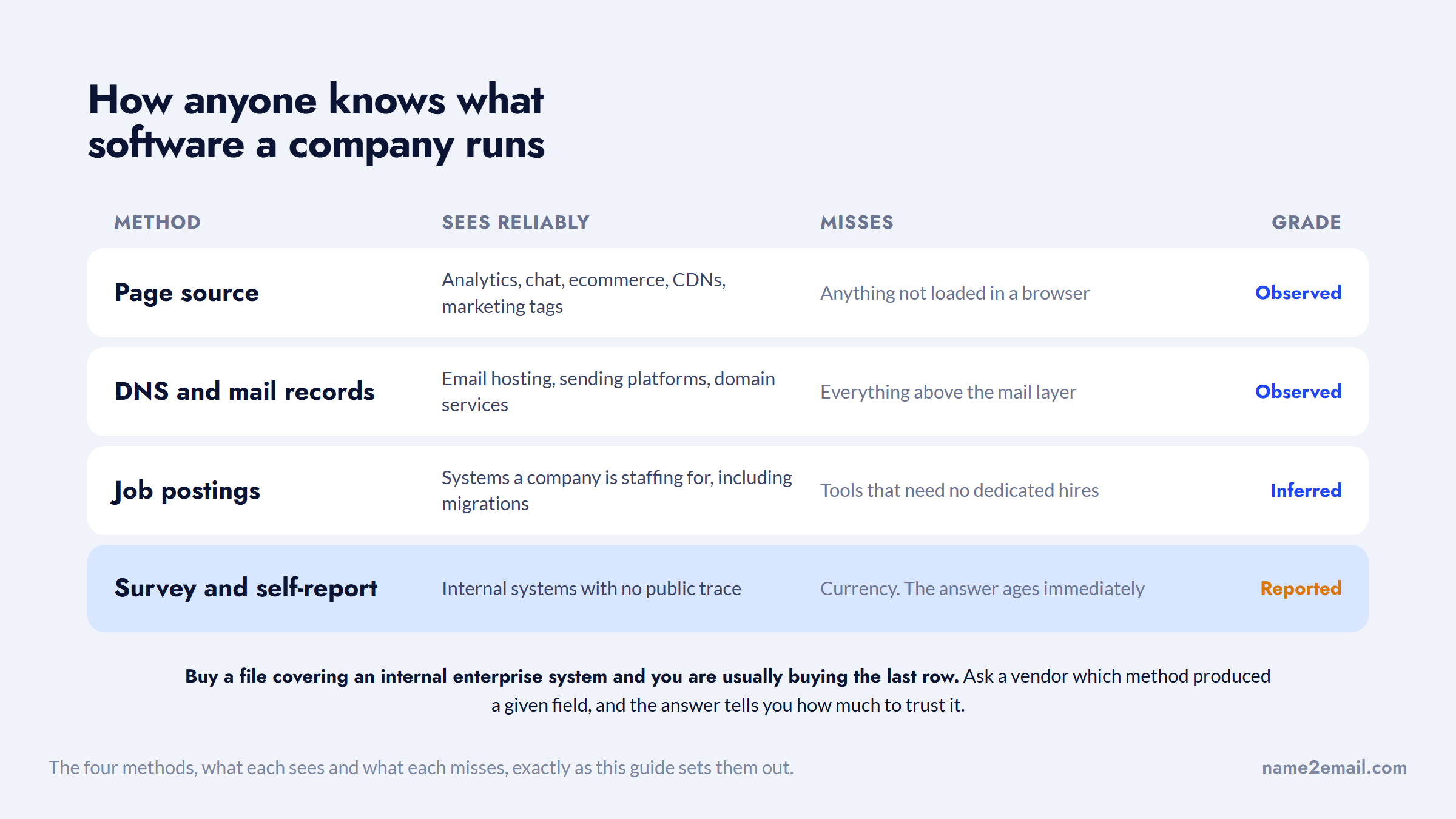
Survey and self-report data is the weakest and the most common in enterprise-software categories, because that is the only way to see systems that never touch the public internet. It is also the least refreshable.
Detection method | What it sees reliably | What it misses |
|---|---|---|
Page source | Analytics, chat, ecommerce, CDNs, marketing tags | Anything not loaded in a browser |
DNS and mail records | Email hosting, sending platforms, domain services | Everything above the mail layer |
Job postings | Systems a company is staffing for, including migrations | Tools that need no dedicated hires |
Survey and self-report | Internal systems with no public trace | Currency; the answer ages immediately |
When you buy a file covering an internal enterprise system, you are usually buying the fourth row. Ask a vendor which method produced a given field and the answer tells you how much to trust it.
The Decay Problem Nobody Prices In
Here is the number that should govern how you buy this data.
Zylo's 2026 SaaS Management Index reports that the average company manages 305 applications, with large enterprises running portfolios as high as 1,000. Total portfolio size barely moved year over year. What moved was the churn: organizations are adding more than eight tools a month on average, an annualized growth rate above 34%.
Sit with that. If roughly a third of a company's application portfolio turns over in a year, then a technographic file is not a stable asset. It is a photograph, and its accuracy declines from the day it is taken.
That reframes what you are buying. A twelve-month list subscription is not twelve months of data, it is twelve months of access to a continuously re-collected dataset, and those are very different products at similar prices. A one-time CSV of ERP users is the photograph, sold as though it were the view.
The two things on sale are not the same product, and the churn is why.
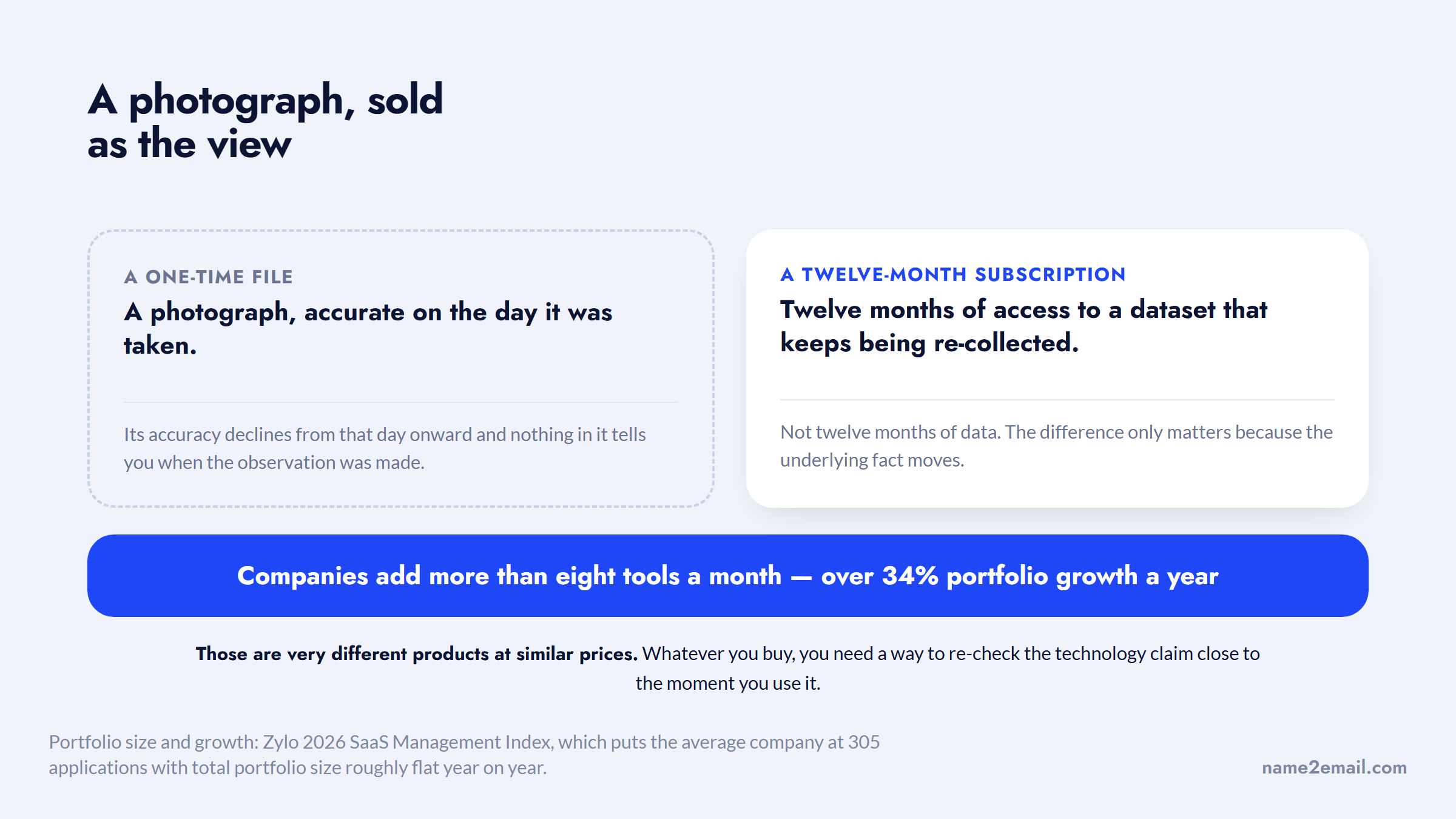
The practical consequence is a refresh cadence rather than a purchase. Whatever route you take, you need a way to re-check the technology claim close to the moment you use it.
Why Two Good Sources Disagree by Three Times
This is worth a section of its own, because it is the clearest available demonstration that technographic numbers are methodology-dependent.
Okta's Businesses at Work 2025 report puts the average number of apps per company at 101, describing it as cracking 100 for the first time after years of flat growth. Zylo, in the same window, says 305.
Neither is wrong. Okta counts applications connected to its own identity platform, which is a specific, well-defined set: the apps an organization has deliberately put behind single sign-on. Zylo counts applications appearing in a company's spend and management data, which includes every tool anybody expensed, whether IT knows about it or not.
One measures the sanctioned stack. The other measures the actual stack, shadow IT included. The gap between them, roughly 200 applications, is a fair estimate of how much software a typical company runs that its own IT department has not centrally enrolled.
On one scale, the disagreement turns out to be a measurement of something real.
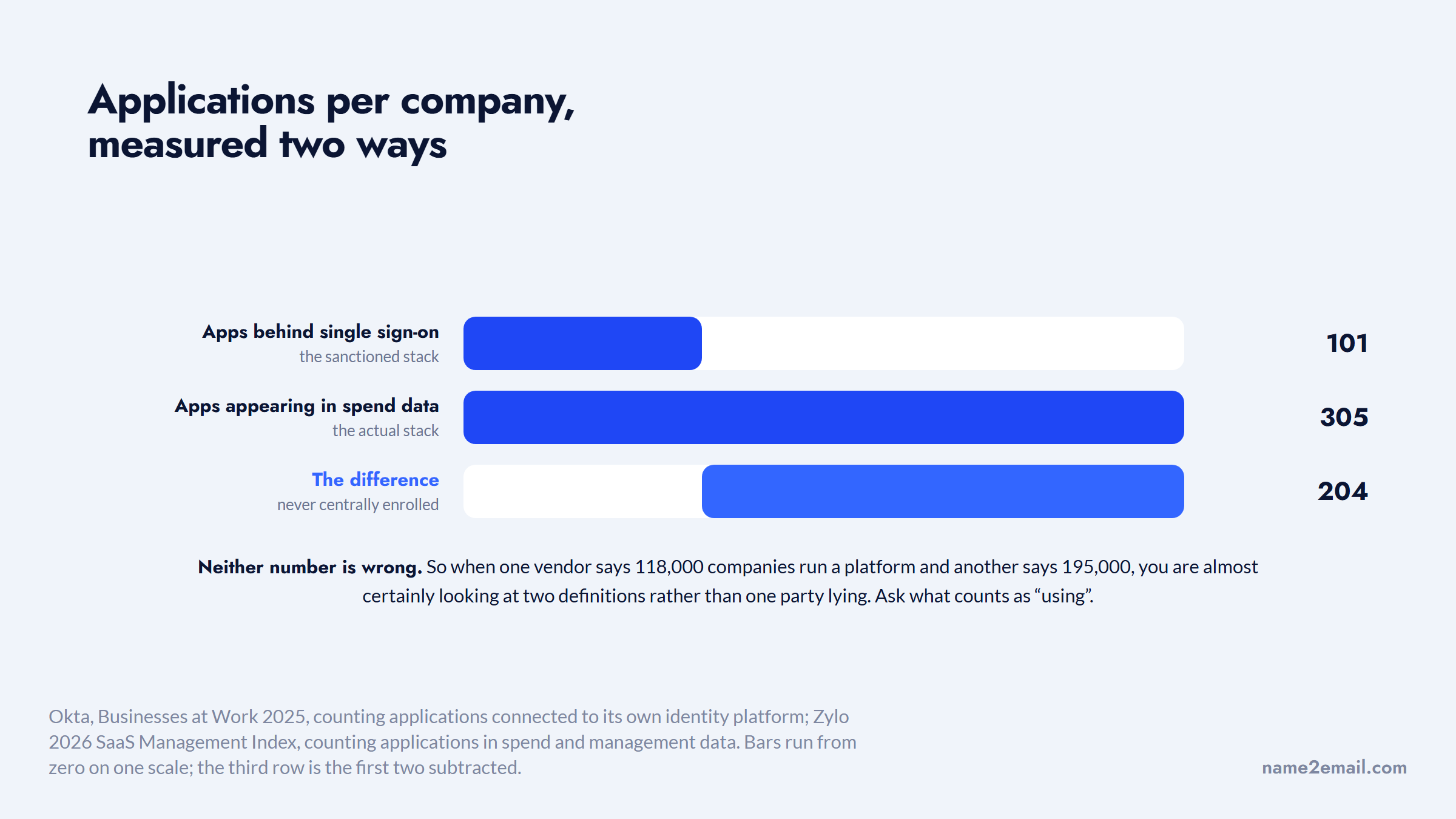
For your purposes the lesson is direct. When a vendor tells you it has 118,000 companies running a given platform and a competitor says 195,000, you are almost certainly looking at two different definitions rather than one party lying. Ask what counts as "using," and whether a single trial seat qualifies.
Detecting a Company's Stack Yourself
For the technologies that leave a public trace, you do not need a vendor at all. The detection tools sell the same lookups the data vendors run.
Running a Stack Check in Four Steps
This is the routine for a target-account list you already have, and it takes minutes per company rather than hours.
- Run the domain through a technology lookup. BuiltWith is free for individual site lookups with no account, and Wappalyzer's free tier covers 50 lookups a month, which is enough for a focused account list.
- Record the categories you care about rather than the full stack. A 60-line technology report is noise; the two or three systems your product touches are the signal.
- Cross-check against the careers page. Open roles naming a system confirm current use and often reveal a migration the website has not caught up with yet.
- Check the mail records if email infrastructure matters to your pitch. A public MX lookup tells you the mail host in seconds and needs no subscription at all.
Doing this for 200 target accounts is an afternoon and gives you something no purchased file does: you know exactly when each observation was made, because you made it.
Where this approach runs out is scale and depth. Checking 50,000 domains by hand is not viable, and page-source detection will never see an on-premise finance system. That is the honest boundary, and it is where paying somebody starts to make sense. Broader data enrichment tools cover the middle ground where you want the checks automated but not the whole database.
What Self-Serve Detection Costs
The detection vendors publish their prices, which already distinguishes them from most of the list market.
Tool | Free tier | Paid entry | Scale claimed |
|---|---|---|---|
BuiltWith | Individual site lookups, forever, no account | Basic $295/mo, Pro $495/mo, Team $995/mo | 491.9M domains, 126,446 technologies |
Wappalyzer | 50 lookups a month | Pro $250/mo, Business $450/mo, Enterprise $850+/mo | Browser extension plus API and lists |
Prices read from each vendor's own plans page in September 2026. Note that BuiltWith's `/pricing` URL resolves to a technology-trends page whose "SaaS Pricing Above $50 Per Month" entries are detection categories rather than plans, so the figures above come from `builtwith.com/plans`.
At $295 a month you are buying list-building and export, not just lookups, which is the feature that turns detection into prospecting. Below that, the free tiers genuinely work for account-based motions where you have a defined target list rather than an open search.
The threshold is roughly where manual lookups stop fitting in a working day. Under a few hundred accounts a quarter, the free tiers cover it; above that, the subscription costs less than the hours.
Budget separately for the contact side, because neither of these tools resolves a person's address. Our own feature set covers that half and costs nothing, which keeps the whole detection-plus-contact workflow inside a free tier for smaller account lists.
The Signals a Bought List Cannot Contain
The strongest technographic signal is not that a company uses something. It is that a company is about to change something.
Migrations, consolidations, and renewals are when budget moves, and none of them appear in a static install-base file, because the file records a state rather than a transition. A company that has run the same ERP for nine years and a company three months into replacing it look identical in a technology users file, and they are completely different prospects.
Set the two records beside each other and there is nothing to tell them apart.
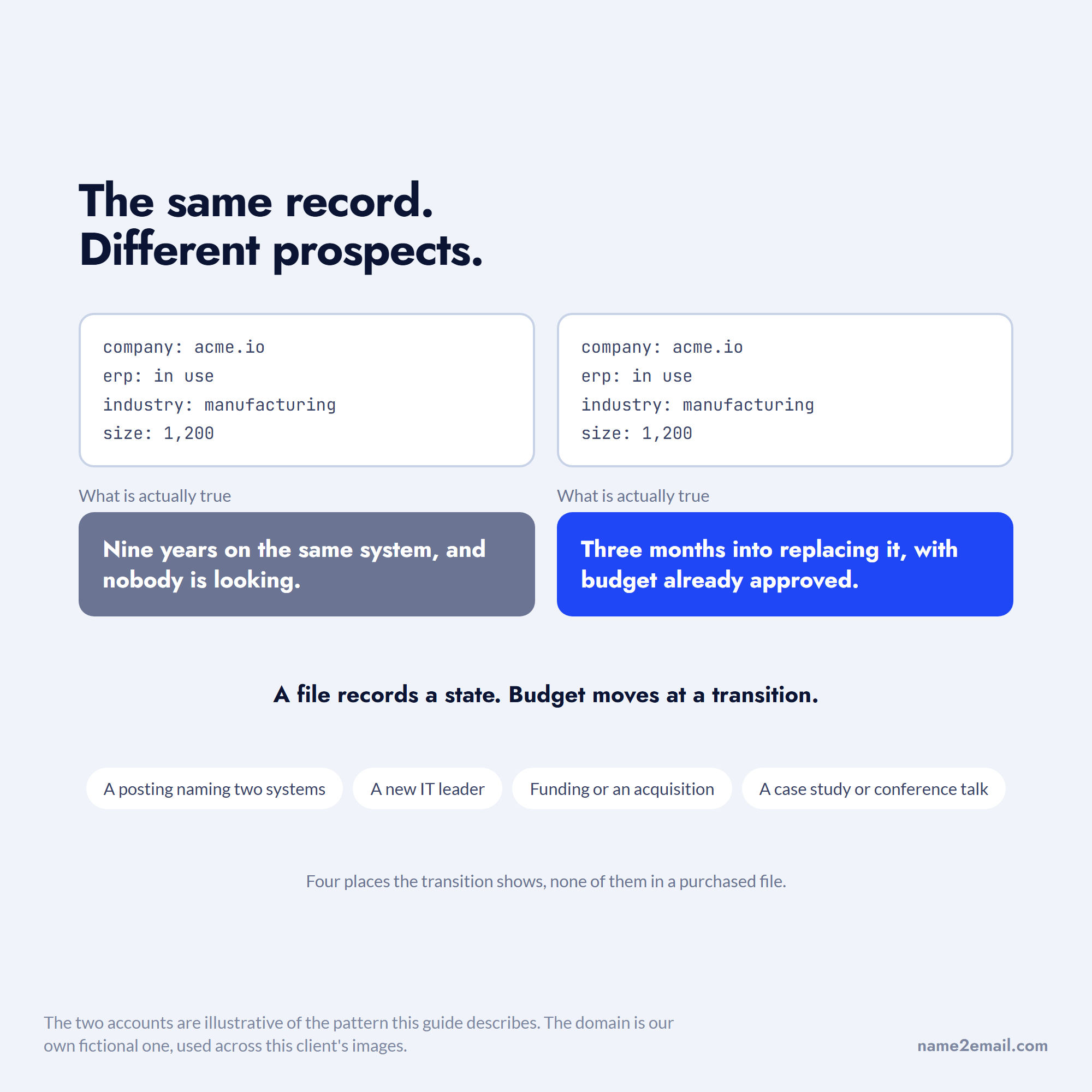
Four places carry the transition signal. Job postings that name two systems at once usually mean a migration in progress. Executive hires in IT leadership reset vendor relationships within a year. Funding rounds and acquisitions trigger consolidation. Public case studies and conference talks announce the change directly, often before the website changes.
None of that is expensive to watch. It is just work that a purchased file does for you. Where a file genuinely helps is the opposite job, going from a company you have identified to the people inside it, which is where company research tools do more than a technographic dataset can.
Detection Gives You a Company, Not a Buyer
Every method above returns a domain. None of them returns a person.
That is the structural gap in technographic prospecting and the reason install-base files bundle contact data at all. You know Acme runs the platform you integrate with. You still need the name of whoever owns that platform internally, and then their work address.
The first half is a research problem: LinkedIn, the company's own team page, conference speaker lists, and the job posting that named the system usually identify the owner. The wider set of routes for that second step is covered in finding an email address.
The second half is what we built for. You type the name and the company domain into Gmail's compose window, we generate the addresses that domain's naming convention would produce, and Gmail shows you the person's photo and name against the one it recognizes.
We should be precise about the limits, because overclaiming here is how this category earned its reputation. We work from public naming patterns instead of a stored database, we are strongest on corporate domains, and some addresses will not resolve. We do not sell contact records and we are not an install-base provider.
What that buys you is unlimited lookups at no cost and no account, which changes the economics of the research-heavy approach this whole guide describes.
What the List Vendors Charge
The technographic list market is almost entirely quote-driven, which is itself informative.
Vendor | Scale claimed | Published price | Segmentation offered |
|---|---|---|---|
Reply.io | 1B+ contacts with intent signals | From $59/user/mo, 14-day trial | Role, industry, size, intent; no technographic field |
Span Global Services | 80M contacts, 18M companies | None; quote and free sample | Technology usage, business context, buying signals |
InfoClutch | Not stated per category | None; quote | Technology category, industry, geography |
TargetNXT | Not stated per category | None; quote, 25+ free samples | ERP, CRM, cloud, security, ecommerce |
DataCaptive | 38M+ global records | None; quote | 40+ data attributes, 10+ segmentation options |
BuiltWith | 491.9M domains | $295 to $995 a month | Technology, keyword, retail reports |
Wappalyzer | Not stated | $250 to $850+ a month | Technology, traffic, location |
The first row is there as a contrast rather than as a recommendation, and in fairness we should say that Reply.io is the company behind Name2Email. Its database is large and bundled into an outreach subscription rather than sold as a file.
What it does not carry is an installed-technology field. It segments on role, industry, size and intent, which makes the wider point for us: a big general database is not a substitute for a detection tool.
Figures taken from the vendors' published pages in September 2026. The pattern is clean: the two detection tools publish prices, and all four of the technographic file vendors quote instead.
That is not automatically a bad sign, since genuinely custom segments are hard to price on a shelf. But it does mean any pricing comparison across this category is a comparison of quotes you personally obtained, not of published rates, so plan to collect three or four before you can judge whether one is reasonable. The wider mechanics of vendor evaluation are in our walkthrough of buying email lists.
Judge Every Option on Cost Per Valid Contact
There is one metric that makes detection tools, list vendors, and doing it yourself directly comparable, and almost nobody uses it.
A practitioner in a Reddit thread on B2B database accuracy put it plainly: the cheapest option is not the cheapest invoice, it is the cost divided by the number of contacts that turn out to be valid.
In the same thread another commenter estimated real-world accuracy across the major vendors at 55% to 65%, with only a marginal 5% to 10% spread between them. Both are practitioner anecdote rather than measured benchmarks, and both are worth testing against your own data.
The denominator is not what you bought, it is what turned out to be real.

Run the arithmetic before you sign anything. A $2,000 file of 5,000 records at 60% validity costs $0.67 per usable contact. A $295 monthly detection subscription that yields 400 verified accounts you researched yourself costs $0.74 each, and those 400 carry an observation date you control.
The two land close enough that the deciding factor is not price. It is whether you need breadth or currency, and technographic data is the category where currency wins most often. Where you do want a shortlist of tools that combine finding and verification, we compare email finding tools on exactly that basis.
Building a Refresh Cadence Instead of Buying a File
Because the underlying fact changes, the deliverable should be a process rather than a document.
Set a re-check interval matched to your sales cycle. If your cycle is 90 days, a technology observation older than 90 days should be re-verified before it drives a message, because at 34% annualized portfolio growth a meaningful share of your accounts changed something in that window.
Re-check only the field that decays. The company name, domain, and industry are stable; the technology claim and the contact are not. Re-running detection on 200 domains is cheap, and it is the difference between "I see you're running this" landing as insight or as an obvious guess.
Keep the observation date in your file as a column. It is the single most useful thing a purchased list will never give you, and the same discipline applies to the narrower case of an SAP users email list, where the systems move slowly but the people around them do not.
Own the Observation, Not the File
The best technographic prospecting in 2026 does not look like buying a technology users email list in usa or anywhere else. It looks like a tight target-account list, checked recently, by you.
That approach scales worse and converts better. It also survives contact with the prospect, because when you reference a system, you are referencing something you confirmed this month rather than something a vendor recorded last year.
Start with the accounts you already want. Run the detection, note the date, find the person who owns the system, and send something specific. When you reach the point of needing the address itself, add Name2Email to Chrome and resolve it in the compose window, and see how other teams use it across similar research-led workflows.
Frequently asked questions
It is a B2B contact file segmented by the software a company runs rather than by industry or size. Each record pairs a company, a technology claim such as "uses Salesforce" or "uses SAP," and a contact at that company. The technology claim is the only part that distinguishes it from an ordinary contact list, and it is also the part that ages fastest.
It depends entirely on how the technology was detected. Anything visible in a website's page source, such as analytics tags, chat widgets, or ecommerce platforms, can be verified directly and is generally reliable. Internal systems that never touch the public web are usually inferred from job postings or surveys, and those claims can be years old. Ask any vendor which method produced a given field before trusting it.
You can, with the same caveats amplified. AI tooling is detectable when it runs in the browser, so chat widgets, AI search features, and customer-facing assistants show up in page-source scans. Internal AI adoption mostly does not, so the strongest available signal is hiring: job postings naming specific models, platforms, or machine learning infrastructure. Treat anything else as inference.
Match the interval to your sales cycle, and treat 90 days as an outer limit for the technology field specifically. Zylo's 2026 index puts annualized application growth above 34%, so a meaningful share of any account set changes something within a quarter. Company details stay stable, which means you only need to re-check the technology claim and the contact, not the whole record.
Compare them on cost per valid contact rather than on the invoice. A file priced at $2,000 for 5,000 records looks cheap until a 60% validity rate makes each usable contact $0.67. A detection subscription plus your own research often lands at a similar figure while giving you an observation date you control. Buying wins on breadth; detecting wins on currency.

We build Name2Email, the free Chrome extension that finds work emails inside Gmail. We write about outreach, prospecting, and getting more replies.
Connect →