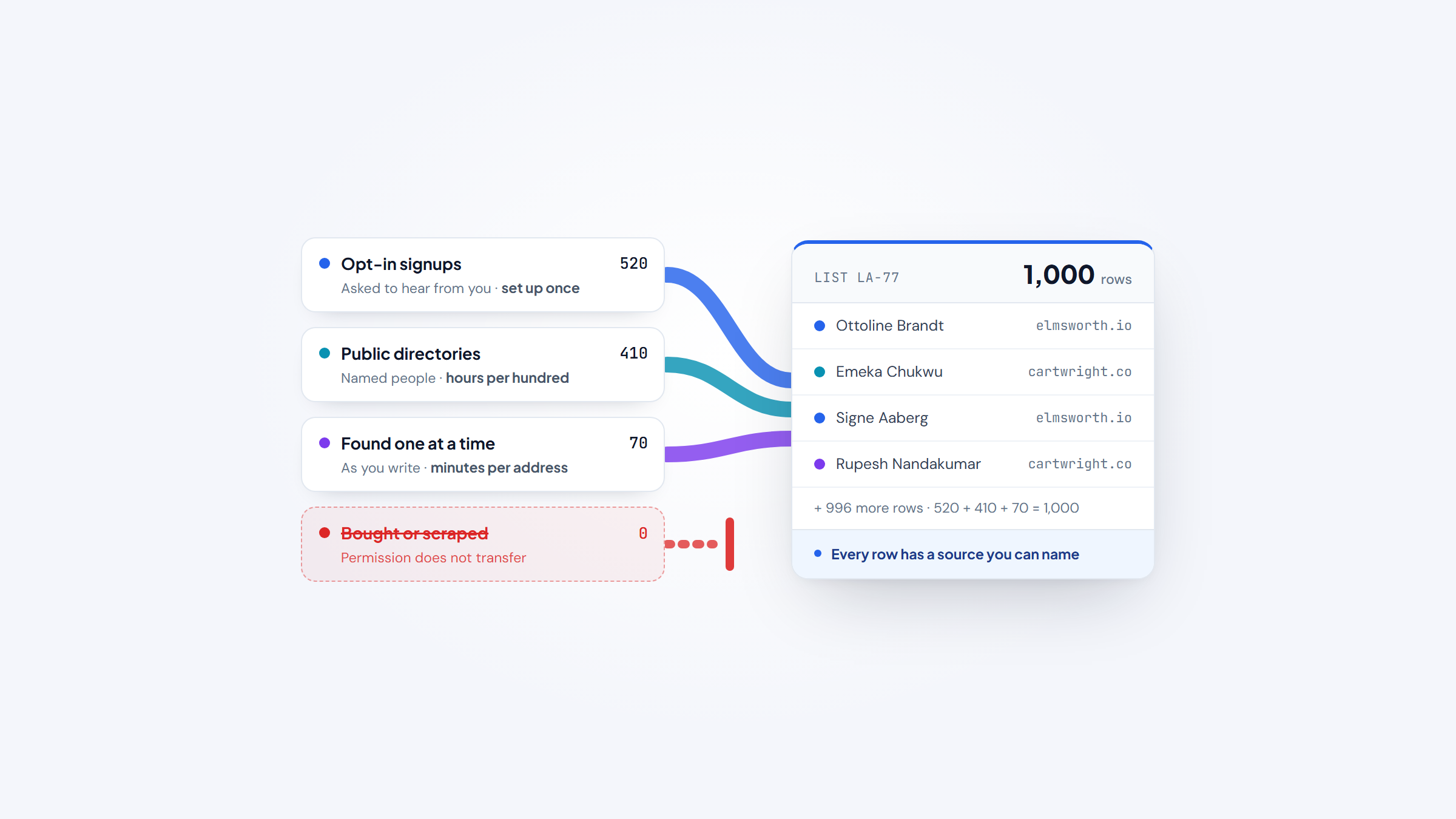
- 1A usable list of email addresses comes from three legitimate routes: opt-in capture, public-source research, and manual finding. Buying or scraping is the route that breaks.
- 2Build in order: collect consent first, source named people from public directories second, and find the individual address last.
- 3Validate before you send, because duplicates, dead domains, catch-all servers, and role addresses each remove a different slice of the list.
- 4Name2Email finds one person's work email inside Gmail as you write. It is a finder, not a list builder, and it does not supply lists.
Search for a list of email addresses and you land in two very different places. One set of pages shows you how to build a list. The other sells you one that already exists. The second group is the reason so many inboxes are full of mail that nobody asked for.
Building your own list is slower, and it is the only version you can defend. You know where each address came from, you know that the person asked to hear from you, and you can clean it before a single message goes out.
This guide covers how a usable list actually gets assembled. You will see the three routes that work, what makes an address valid, how to validate a list before you send, where free and random lists come from, how those scam-address searches should be handled, and how to pull addresses out of Gmail, Outlook or Exchange without breaking anything.
What Counts as a List of Email Addresses
A usable list is worth exactly what you can prove about it: where each address came from, whether the person agreed to hear from you, and whether the address still works. Most lists that circulate online fail at least one of those tests, which is why they cost almost nothing.
Three kinds of list hide behind the one phrase. A permission list is one you built yourself from people who opted in, and you control it, you can mail it, and it stays valuable as long as you keep it clean.
A research list is one you assemble from public sources: company sites, professional registers, government directories. You have a real person at a real company, and you still need their address.
A junk list is one you bought, scraped, or downloaded from a free page. It was cheap to make, and the addresses on it were never meant for you.
The distinction drives everything that follows, because the same word hides very different legal and deliverability positions. A permission list can be mailed with confidence, while a scraped list is a bounce and complaint problem waiting to happen.
Permission-based and research-based lists get confused constantly, which is why it helps to know our feature set as a finder rather than a source of records. A listing of email addresses you can actually use has far fewer rows than one you download, and every row on it earns its place.
The Three Ways a Usable List Actually Gets Assembled
Most people assume there is one way to get a list, and that it involves buying something. There are three routes that produce addresses you can actually use, and they differ in effort, ownership, and what they are good for.
Route | What you get | Typical effort | Best for |
|---|---|---|---|
Opt-in collection | Addresses from people who asked to hear from you | Set up once, grows over time | Newsletters, product updates, repeat outreach |
Public-source research | Named people at named companies, found in directories | Hours per hundred | B2B outreach to a defined segment |
Manual finding | One confirmed address at a time, as you write | Minutes per address | Small lists where every contact matters |
The routes are not competing. A healthy outreach list usually runs two of them at once: a permission list for the people who already know you, and a researched list for the people you want to reach for the first time.
Method 1: Collect Opt-In Addresses You Own
This is the only route where the list belongs to you outright, and it starts before anyone sends a message. The addresses come from people who chose to give you their details, usually in exchange for something useful.
Where Opt-In Addresses Come From
The sources are not exotic, and most of them already exist on your site. The setup below takes an afternoon and then runs by itself.
- Put a signup form on the pages where intent already exists: pricing, a resource download, a checkout, or a booking page.
- Offer something specific in return, such as a template, a checklist, or early access, rather than "news and updates."
- Turn on double opt-in so the person confirms from their own inbox and typos never enter the list.
- Validate the address at the moment of capture, not months later, so a fake signup never reaches the list.
- Record the source and the date of consent on every row, because that is the detail you will need later.
- Tell people what they signed up for and how often you will write.
Consent captured this way is durable. A form on a pricing page attracts people who were already close to a decision, so the addresses you collect are warmer than anything you could source elsewhere.
Why Consent Is the Part You Cannot Retrofit
You can clean a list later. You cannot add permission later. A list built on consent can be mailed for years and survives a rebrand, a new sender, and a move between platforms. A list assembled any other way is a liability that gets worse as it grows, because every message to a stranger who never opted in teaches the mailbox providers something about you.
Consent also changes what you can say. When people asked to hear from you, a message about a new feature is expected rather than intrusive, and unsubscribes stay low. When they did not ask, the same message reads as spam even if it is well written. That gap is the whole reason the opt-in route is worth the extra setup.
Opt-in lists still decay. People change jobs and abandon inboxes, so even a permission list needs the hygiene routine later in this guide.
Method 2: Build From Public Directories and Company Pages
When you need a list of companies with email addresses, or you are targeting a profession, the raw material is already public. You are assembling named people from sources that were meant to be read, which is a different activity from scraping.
The Directory Types That Publish Real Addresses
Start with the company itself. Most businesses publish a contact page and a team page, and the team page usually gives you names, roles, and sometimes the domain convention they use. From there, widen to sources that exist to list people.
Professional registers are the strongest source for licensed fields: state bar directories for lawyers, medical and dental boards for practitioners, and accountancy registries for finance roles. Public-sector directories are close behind, since state agencies and city governments publish staff contacts by department.
Trade associations and chambers of commerce list member businesses, and a name next to a company domain is what email finding tools need to produce an address. The same route works whether you need a list of company contacts for a B2B segment or a list of college email addresses for a campus program.
University directories deserve their own note, because a lot of people search for a list of college email addresses. Faculty and staff pages usually publish addresses on the institution's own domain, such as a name at a university dot edu. Student directories are a different matter and are usually private, which is a privacy protection rather than an obstacle to work around.
Turn a Directory Into Rows, Not a Wishlist
The work is mostly copying and labeling, and a deliberate order keeps the sheet usable. Run the five steps below for each source you add.
- Pick one source and one narrow segment, such as "orthodontists in Ohio" or "SaaS finance directors in Austin."
- Copy the named people and their company domains into a spreadsheet, one row per person.
- Fill in the company domain for every row, because a domain is what a pattern-based finder needs.
- Note where each row came from, so you can prove provenance if someone asks.
- Check each row against your suppression list before you write, so you never re-contact someone who opted out.
A spreadsheet of a thousand names is not yet a list of addresses. It is a target list that is ready for the final step, which is turning each name into a working address.
Method 3: Find the Individual Address From a Name
Every route above ends in the same place. You have a name and a company domain, and you still need that person's actual address. This is the last mile of list building, and it is the part that costs the most time if you do it by hand.
We built Name2Email to close that gap. It is a free Chrome extension that finds anyone's work email inside Gmail. You type a name and a company domain into the compose window, and we generate the likely patterns: first.last, f.last, first, and so on.
Hover over the suggestions and Gmail surfaces the person's name and photo for the address that is real. There is no account, no credit meter, and no cap on lookups, so you can work through a target list without watching a balance count down.
We are honest about where it works. Name2Email builds addresses from naming patterns rather than a stored database, so it cannot guarantee every address.
Coverage is strongest on corporate domains that follow a convention, and weakest on small teams using free mail providers. When none of the suggestions resolve, that person probably cannot be found this way, and it is better to learn that in the compose window than from a bounce. How it works is a five-step loop you can run in seconds.
One thing we are not: Name2Email is not a list builder, and we do not supply lists. It finds one person's address at a time, in the email you are already writing. The list is still yours to assemble, which is exactly why it stays yours.
What Makes an Email Address Valid
Valid is a narrower word than people expect. An address is valid when its structure follows the standard, and deliverable when the mailbox actually exists. Those are two different tests, and a list of valid email addresses can still bounce.
Every address has the same two halves: a local part, then an at sign, then a domain, as in jane.smith@example.com. A list of example email addresses will show you the shapes that appear in practice: first.last@company.com, f.last@company.com, first@company.com, and role addresses such as info@ and sales@.
The local part is case-sensitive in the standard, but most mail servers treat it as case-insensitive, which is why Jane.Smith@ and jane.smith@ usually reach the same person.
The domain half is where most false positives hide. A typo like gmai.com can pass a format check and still be dead, and a domain that expired last month will fail every message you send to it. A list of example email addresses is useful for spotting the shapes, but it never tells you whether a specific mailbox is live.
How to Validate a List Before You Send
Validation is the step that turns a pile of addresses into a list you can mail. Run the cheap checks across the whole list first so the slower ones touch fewer addresses.
Check | What it catches | How to run it |
|---|---|---|
Duplicates | The same person twice under one address | Dedupe on the full address, case-insensitive |
Syntax | Typos and malformed addresses | A format check at import |
Domain and mail record | Dead, mistyped, or expired domains | A DNS lookup for a mail exchanger record |
SMTP probe | Mailboxes that no longer exist | A tool that talks to the receiving server |
Catch-all | Domains that accept every address, where valid means little | Flag them and treat them separately |
Role addresses | info@, sales@, admin@ that reach a team, not a person | Suppress them for one-to-one outreach |
Disposable domains | Throwaway inboxes | A domain blocklist |
Hard bounces | Addresses that already failed | Remove permanently and never re-add |
The SMTP check sounds definitive and is not. The SMTP standard says a server may disable address verification outright, and some servers do not check whether a recipient exists until after the message body has arrived.
That is the technical reason a validator claiming 100% deliverable is overstating its case, and it is why we describe Name2Email as a finder rather than a validator. We confirm what we can through Gmail and we do not pretend to guarantee the rest.
You can confirm most of these yourself with address verification checks, including the tests that need a mailbox you control.
Where Free and Random Lists Come From, and Why They Fail
A free list of email addresses and a list of random email addresses are usually the same thing wearing different labels. Free lists are a byproduct. The addresses are collected from forums and comment sections, recycled from old leaks, or generated by pairing common first and last names with common domains.
Scraping tools make this look easy, which is the trap. Any address you can pull from a public page has already been pulled by a hundred other people, and none of them collect a permission to contact the person behind it.
The tell shows up in the bounce rate. A list assembled with permission bounces in the low single digits, while a list of random addresses bounces far more and gets sending accounts restricted fast.
One marketer on r/Emailmarketing described a 75,000-contact list that got a sending platform to ban the account after roughly 20% to 30% of the first batch bounced. That Reddit thread is worth reading before you download any list offered for free.
Mailbox providers read that pattern as a signal about the sender, not the list. Outlook.com's postmaster rules require authentication for domains sending more than 5,000 messages a day, routing non-compliant mail to junk before rejecting it outright. When your list is mostly strangers who never opted in, those are the rules you are playing against.
This is the point where the honest answer is to skip the shortcut. Paying for a list does not transfer the permission to mail it, a gap the full legal position in buying email lists sets out plainly.
The Scam Side: Searches for a List of Scam Email Addresses
Some people come to this topic looking for a list of scam email addresses or a list of scammer email addresses, and they usually mean one of two things. They want to block and report the addresses hitting their inbox, or they want a blocklist to filter mail. Neither is an outreach list, and treating one as the other causes real trouble.
There is no reliable public list of scam email addresses, and that is by design. Scammers rotate through addresses and spoof the display name, so any published list goes stale within days. The addresses are also often forged to look like real ones, which means a list of scammer email addresses would sweep up innocent people whose only mistake was having their domain copied.
The practical move is to report rather than collect. Forward the message to your provider's abuse address, report it to the FTC at ReportFraud.ftc.gov, and delete it. Never reply, never click the link, and never import those addresses into any tool you use for real outreach.
A blocklist is a different tool with a different purpose. Use it to keep known-bad senders out of your inbox, not to assemble prospects. If an address turns up on a scam list and in your pipeline at the same time, the pipeline entry is the one that should go.
How to Get Email Addresses Out of Gmail, Outlook and Exchange
A second version of this question is about exporting addresses you already have. People want the Gmail list of addresses sitting in their contacts, or they need to copy addresses into Outlook, or they ask how to pull them out of Exchange. Each has a plain path, and each produces the same thing: a file you can clean and re-import.
Where the addresses live | How to get them out | What you get |
|---|---|---|
Google Contacts | Contacts, select people, More actions, Export | A Google CSV |
Outlook on the desktop | File, Open and Export, Import and Export, Export to a file | A contacts CSV |
Outlook on the web | People, Manage, Export contacts | A CSV |
Exchange and Microsoft 365 | Exchange PowerShell with Get-Mailbox or Get-Recipient | A CSV of mailbox addresses |
A Gmail label or an old thread | No clean export; move the people into Contacts first | No file; move people into Contacts first |
One warning saves an afternoon. Export contacts, not mail. A mailbox export produces a large archive of messages rather than a tidy column of addresses, and any addresses inside it are buried in message headers where no spreadsheet can reach them.
If the address you need is not in your contacts yet, that is the moment the tool and the task meet. Name2Email lives inside the Gmail compose window you already have open, so you find a person and write to them without exporting anything. When you do need to send one message to a set of people individually, mail merge in Gmail handles the loop for you.
Hygiene: Keeping the List Alive
A listing of email addresses is not a one-time asset. Addresses go stale when people change jobs, abandon inboxes, or let a domain lapse, and a B2B list sheds contacts every year for exactly those reasons.
A thread on r/Emailmarketing put the problem cleanly: validation has a shelf life. The commenter described teams proudly waving a six-month-old validation report at a B2B list that was already half job-changers, then wondering why bounces spiked after a send. That single Reddit detail is worth more than most list-building advice, because it reframes validation as a routine rather than an event.
A short rhythm keeps a list healthy and costs about an hour a month.
- Validate new addresses as they arrive, not in one batch a year.
- Re-validate anything you have not mailed in six months or more.
- Keep sending regularly, because a list that goes quiet collects bounces.
- Remove hard bounces on the first failure and never re-add them.
- Sunset subscribers who have not engaged in a long stretch, so they stop dragging your sender reputation down.
The list you mail is also the list your provider judges. Software built for email list management can automate most of that rhythm once a list is large enough to justify it, but the order never changes: collect with permission, validate before sending, and remove whatever fails.
The Rules That Keep a List Usable
The rules around a list are mostly about permission, and they are narrower than people fear. In the United States, commercial email is opt-out: you may email someone you have a relationship with, but every message needs a working way to opt out and a truthful sender. In the European Union and the United Kingdom, consent is the safer basis for marketing, which is why a list built on opt-in travels better across borders.
Two habits keep you inside the lines. Keep an unsubscribe that works in one click and honor it immediately. Keep a suppression list, and never mail anyone on it, no matter which list they appear on next.
None of that changes the core advice. Build the list yourself, one source you can name at a time, and it will outlast any list you could have bought. A permission list you assembled is an asset that compounds. A list you bought is a cost that recurs every time you need contacts again.
Start With Consent, Finish With the Address
A list is not a file you acquire. It is a set of people you have earned the right to contact, plus the discipline to keep their details accurate. Start with consent, layer in public-source research when you need reach, and find the individual address as the final step rather than the first. When the list is built and a record is still missing a field, filling it in bulk is a job for lead enrichment tools.
If that last step is where you get stuck, it is exactly what we built Name2Email for. It is free, it works inside Gmail, and it finds one person's work email as you write to them. We are a finder, not a list builder, and we do not supply lists, but we do make the last mile faster. Add to Chrome and find your next contact without leaving your inbox.
Frequently asked questions
Build it yourself from three free sources. Collect opt-in addresses with a form and double opt-in, pull named people from public directories such as company team pages and professional registers, and validate the result before you send. Name2Email is free as well, and it finds the individual address for each named person inside Gmail, but it does not hand you a ready-made list. Treat any list of random email addresses that promises instant volume as a warning sign, not a head start.
A valid address is correctly formatted and sits on a domain with a working mail record. A deliverable address is one where the mailbox actually exists and accepts your message. A list of valid email addresses can still contain catch-all domains and abandoned mailboxes, so run an SMTP check and suppress hard bounces rather than trusting format alone.
Export the contacts first, then import. In Outlook on the desktop, use File, Open and Export, then Import and Export, and choose Export to a file. For Exchange and Microsoft 365, run Get-Mailbox or Get-Recipient in Exchange PowerShell and select the address field, which gives you a CSV. To copy a list of email addresses into Outlook, import that CSV and the contacts appear as a folder.
It depends on where the recipients are and how the list was built. A list you collected with permission is the safest starting point. A scraped or purchased list is risky in the US and much riskier under EU and UK rules, where consent is the stronger basis for marketing. Whichever route you use, every message needs a working opt-out.
No. Name2Email is a free Chrome extension that finds one person's work email at a time inside Gmail, using naming patterns and a hover-to-confirm step. It is not a list builder and it does not supply lists. You still assemble the list from your own sources, and we help with the final step of turning each name and company into a working address.

We build Name2Email, the free Chrome extension that finds work emails inside Gmail. We write about outreach, prospecting, and getting more replies.
Connect →