- 1A professional email is one clear message in six parts: subject line, greeting, body, closing line, sign-off, and signature.
- 2Put your purpose in the first sentence or two. Busy readers skim, and professionals reply to only about 25% of the email they receive (Harvard Business Review).
- 3Match your tone to the recipient, not to your mood, because readers misjudge tone over email more often than senders expect (Kruger and colleagues, 2005).
- 4For an angry email, write the draft, save it, and send a calmer second version. For a thank-you or a follow-up, shorter almost always lands better.
Email is still how most professional conversations start, and it is often the first impression you make on a new client, a hiring manager, or a colleague in another office. That is why the stakes feel higher than the task deserves. You are not writing a letter. You are writing one clear message that respects someone's time and makes the next step obvious.
The good news is that professional email is a recipe, not a talent. Once you know the six parts and how to read your recipient, you can write a good one in a few minutes. This guide walks through how to write an email professionally in the order you actually write one, then covers the situations that trip people up most: thank-you notes, interview follow-ups, and the angry email you should probably not send as written.
What Makes an Email "Professional"?
Professional does not mean stiff, and it does not mean long. A professional email is clear, considerate of the reader's time, and correctly formatted. It says what it needs to say, then stops.
The opposite is the email that buries its point in paragraph four or asks three unrelated questions in one message. Readers do not reward effort. They reward clarity. If you want the deeper habits behind that, the guide to writing a good email covers tone, length, and structure in more detail.
One more distinction matters up front. Formal and professional are different axes. A message to your manager about lunch plans can be casual and still professional. A message to a stranger asking for a favor can be warm and still formal. The recipe below holds either way.
Read the Recipient Before You Write a Word
Professional writing starts with the person on the other end, not with you. Ask three questions before you type. How does this person use email: as a quick chat, or as a formal record? What is your relationship to them: manager, stranger, peer, or client? What do you want them to think of you after they read this?
The three answers set your register, which is the level of formality you pitch the whole email at. Pitching it wrong is the most common reason a perfectly written message lands badly. And it is easy to pitch it wrong, because tone is genuinely hard to read over email.
A 2005 study by Kruger and colleagues in the Journal of Personality and Social Psychology found that people consistently believe they communicate tone more clearly over email than they actually do. The researchers called it egocentrism: senders "hear" their own sarcasm, warmth, or urgency, and assume the reader does too. Readers usually do not.
The practical fix is to err toward the reader's likely expectation. When you do not know someone's preference, choose the more formal option. You can relax later once they reply. The table below maps common relationships to a register, a greeting, and a closing.
Recipient | Register | Greeting | Closing |
|---|---|---|---|
Senior leader or stranger | Formal | Dear Dr. Patel, | Sincerely, |
Client you have met | Warm formal | Hello, Sam, | Best regards, |
Peer or teammate | Casual | Hi, Dana, | Thanks, |
Someone who emailed you first | Mirror theirs | Match their greeting | Match their closing |
Unknown name | Neutral formal | Dear Hiring Manager, | Best regards, |
The safest move when the relationship is unclear is to mirror the last email you received. If they opened with "Hi Jordan," they are telling you that "Hi" is fine.
Once you know who you are writing to, you need their actual address. Hunting for a work email is a small task that eats time when you are mid-compose. We built Name2Email, a free Chrome extension, to do it inside Gmail: you type a name and company domain, and it suggests the likely patterns. If you are checking a name before you write, the guide to looking up an email address walks through the reverse check.
How to Write an Email Professionally, Step by Step
Learning how to write an email professionally starts with the same six parts, and each one has a job. Get the order right and the message almost writes itself. The table below is the whole recipe on one screen.
Part | What it does | Rule of thumb |
|---|---|---|
Subject line | Tells the reader what this is | Under 60 characters, specific |
Greeting | Signals the relationship | Mirror how they address you |
Body | Carries the request or update | Purpose first, context second |
Closing line | States the next step | One clear ask or deadline |
Sign-off | Ends politely | Match the greeting's formality |
Signature | Identifies you | Name, title, company |
Work top to bottom. Draft the subject line last if that helps, because by then you know what the email is really about. The rest of this guide takes each part in turn and shows you how to write it.
Craft a Subject Line That Earns the Open
The subject line is the only part of the email everyone reads. It decides whether the rest gets opened, skimmed, or left unread. Make it specific, short, and honest about what is inside.
Length matters more than people think. Keep it under 60 characters so it does not get cut off on a phone, and lead with the specific thing rather than a generic word like "Update" or "Question." A subject line that names the project, the person, or the deadline gives the reader a reason to open it now instead of later.
Turning a vague subject into a useful one takes four small passes. Start by writing the one thing you want the reader to do or know, then add the detail that makes it theirs, such as a project name, a date, or a reference number. Cut filler words like "quick," "just," and "following up on." Finally, read the subject as if it landed in a full inbox, and check that it still makes sense tomorrow.
Good examples: "Q3 budget review: two questions," "Interview follow-up: marketing associate," and "Meeting Thursday at 2 p.m." Each one names the subject and the action. None of them makes the reader guess.
Choose a Greeting That Fits the Relationship
The greeting sets the tone in a single line, so spend ten seconds on it. For a first contact with someone senior, use "Dear" plus their title and last name: "Dear Dr. Chen," or "Dear Ms. Okafor," When you know the person or you are writing to a peer, "Hi" plus their first name is fine and reads warmer.
For a group, address the group rather than a person: "Hi everyone," or "Dear team," When you genuinely cannot find a name, "Dear Hiring Manager," or "Dear Selection Committee," beats "To whom it may concern," which reads as a shrug. Take sixty seconds to check the company site or a directory first; a real name changes how the whole email lands.
Avoid slang openers like "Hey!" with someone you do not know. It can read as presumptuous even when you mean it as friendly. When you are unsure, choose the more formal greeting. "Dear" is very rarely read as too formal, even from a stranger.
Build a Body That Gets a Reply
The body is where most professional emails succeed or fail. Two habits do most of the work: front-load the purpose, and keep it short. Readers skim, decide, and move on, so the first two sentences have to carry the point.
Professionals receive around 120 messages a day and reply to only about a quarter of them, according to the Harvard Business Review. That ratio is your design constraint. If your request sits at the bottom of a long email, it competes with everything else in their inbox.
Use the steps below to write a body readers act on.
- Open with your reason for writing in one sentence.
- State the specific ask or update that follows from it.
- Add only the context the reader needs to act, and put background after the ask, never before it.
- Break the message into two or three short paragraphs, or a short numbered list if you have several requests.
- Close the body by naming the next step and who owns it.
Keep one idea per paragraph. If you find yourself writing a fourth sentence about the same point, cut it or split it. Bold a single date or figure if it genuinely matters, and skip the rest of the formatting. An email with every other word in bold emphasizes nothing.
Close and Sign Off Cleanly
The closing line tells the reader what happens next, and the sign-off ends the message politely. Together they take two lines, so there is no reason to rush them. Name the next step in plain language: "Could you confirm by Friday?" or "I will send the draft Monday." That single sentence removes the guesswork a vague ending creates.
Sign off at the same formality as your greeting. "Sincerely" pairs with "Dear," and "Thanks" or "Best" pairs with "Hi." If you want the full menu of options and what each one signals, the guide to ending an email covers closings and their registers in depth.
Finish with a simple signature: your name, your title, and your company. Add a phone number only if you want calls. Keep it to four lines or fewer so it does not dwarf the message above it.
How to Write a Professional Thank You Email
A thank-you email is one of the easiest professional emails to get right, and one of the easiest to overthink. Send it within a day of the event, keep it to a few sentences, and name the specific thing you are thanking the person for. Generic thanks read as a formality. Specific thanks read as attention.
The shape is simple. Thank them, name what they did and why it mattered, then close warmly. If there is a next step, add one sentence about it. If there is not, stop. Do not pad the message to make it feel more substantial.
Here is a short template you can adapt for almost any situation.
> Subject: Thank you for the intro to Dana
>
> Hi Priya,
>
> Thank you for introducing me to Dana. Your note saved me a week of cold outreach, and we are already comparing calendars.
>
> I will keep you posted on how it goes.
>
> Best,
> Jordan
The same steps answer how to write a professional thank you email after an interview: name the role, the date, and one detail you appreciated.
For a sign-off that matches the tone of a thank-you note, the catalog of closing salutations is worth a look. "Thank you," "Best," and "Warm regards" all fit, and each sets a slightly different temperature.
How to Write an Angry Email Professionally
The angry email is the one most likely to cost you something, so how to write an angry email professionally is as much about timing as wording. The goal is to get the problem fixed without making the reader defensive, because a defensive reader stops solving and starts defending.
The people who handle this best do not write less. They write first and send later.
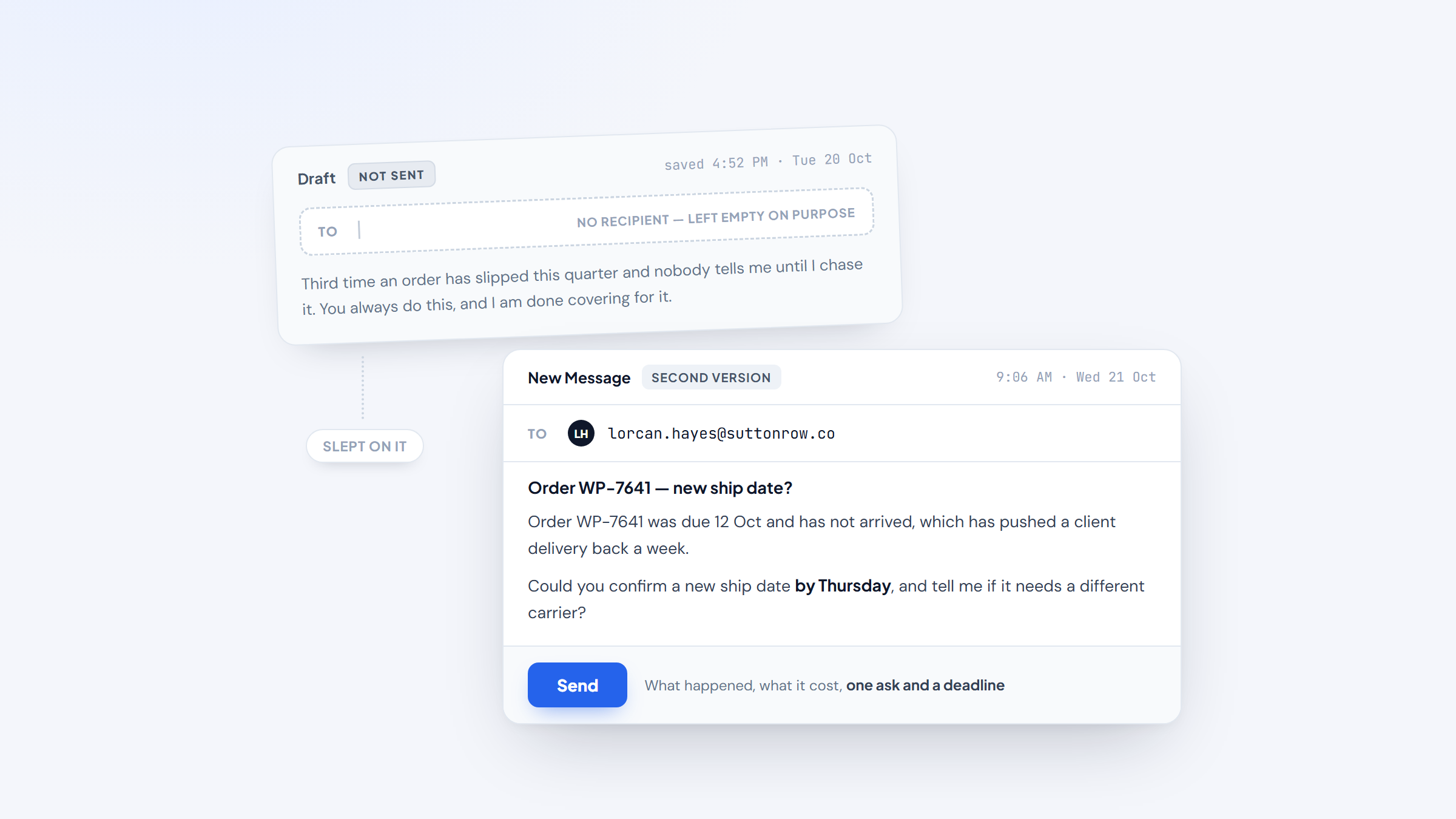
In a widely upvoted Reddit thread on writing an angry email at work, the top advice was to save it as a draft and clear your head before hitting send, with one commenter adding that you should not fill the To: line until you are ready. The thread is anecdotal, but the advice matches what the tone research says about misread emotion.
Use the steps below to turn the vent into a professional message.
- Write the unfiltered version first, in a draft, with no recipient filled in.
- Wait, then reread it and separate the facts from the frustration.
- State the issue in neutral language: what happened, when, and what it cost.
- Ask for the specific fix you want, and give a reasonable deadline.
- Cut blame, sarcasm, and words like "always" and "never," which invite an argument.
- Reread once more for tone before you add the recipient and send.
A template keeps the message structural when you are annoyed. The one below states the problem and the fix without assigning fault.
> Subject: Re: delayed shipment on order 4821
>
> Hi Marco,
>
> Order 4821 was due on September 12 and has not arrived, which has pushed back a client delivery for us.
>
> Could you confirm a new ship date by Thursday, and let me know if it needs a different carrier? I would rather solve this now than escalate it.
>
> Thanks,
> Jordan
Notice what the template leaves out: no accusations, no history, no audience beyond the person who can actually help. If the issue is serious enough to need a paper trail, copy one person who should know, and say nothing in the email you would not want forwarded. That last rule holds for every angry email you send.
Emails for Interviews and New Contacts
Two situations make people overwrite: how to write an email to a professional you have never met, and what to say after a job interview. Both go better when you front-load your purpose and keep the message short. The person reading is busy, and a tight email signals respect for that.
For an interview follow-up, send it within a day. Reference the role and the conversation, restate one thing that made you a fit, and thank them for their time. That is the whole email. If you are asking for an interview rather than following up, say who you are, why this company, and what you are asking for, in that order.
The table below shows the subject and opening patterns for the new-contact emails people ask about most.
Situation | Subject line | Opening move | Close |
|---|---|---|---|
Thank-you after an interview | Interview follow-up: [role] | Thank them, name the role | Looking forward to hearing from you |
Requesting an interview | [Role] inquiry: [your name] | Who you are and why them | Best regards |
Intro to a stranger | [Name] intro via [source] | Name the connection | Thanks for considering |
Warm follow-up | Re: our conversation | Reference where you left off | Talk soon |
Figuring out how to write a professional email for an interview is really just applying the recipe under pressure, so return to the six parts if you get stuck. Find the interviewer's name if you can, greet them by it, and get to your point in the first line.
When you are unsure how to write an email to a professional contact you have not met, work through the six parts in order and stop as soon as the ask is clear.
If you cannot find the hiring manager's address, that is exactly where a finder earns its place. We designed our free extension around the in-Gmail flow, so you can confirm the address by hovering before you send anything to it.
The Mistakes That Undo a Good Email
Most unprofessional emails are not rude. They are careless in small ways that add up. A subject line that says "Question," a wall of text with no break, a sign-off that does not match the greeting. Each one is minor alone and corrosive together.
Run this checklist before you hit send.
- The subject line names the specific topic.
- The purpose appears in the first two sentences.
- The email asks for one clear thing, or names why it asks for more.
- Every paragraph is short enough to skim.
- The greeting and sign-off match the relationship.
- The signature identifies you and your company.
- You have read it once from the recipient's point of view.
Passing all seven takes about thirty seconds, and it catches the errors that matter most. The single most common one is burying the ask, which the checklist catches first.
Send at the Right Time, Then Follow Up
Timing does more than most people expect. Many professionals read email only during working hours, so a message sent at 11 p.m. can sit until morning regardless of how urgent it feels. Send during the recipient's working hours when you can, and schedule it if you are writing late.
If you hear nothing back, one short follow-up is reasonable and expected. Wait five to ten business days for a routine request, or two to three when it is time-sensitive, and reply in the same thread so the context stays attached. Keep the nudge to two or three lines: remind them of the ask, restate the deadline, and leave it there.
Two follow-ups is the ceiling for most situations. If a third is genuinely warranted, pick up the phone instead. For the full playbook, including how to space a sequence, the guide to cold email follow-up covers it in detail.
Send the Next One With the Recipe
Professional email is one of the few business skills you can improve in an afternoon. The recipe for how to write an email professionally does not change: read your recipient, front-load the purpose, keep the body short, close cleanly, and sign off at the right formality. The situations change, the skeleton does not.
When you are ready to write, the last missing piece is often an address. Name2Email finds work emails inside Gmail as you compose, so you can go from a name and a company to a confirmed contact without leaving your inbox. If you need many addresses rather than one, building an email list is the process to follow first. It is free, needs no account, and works best on corporate domains; we will also tell you plainly that pattern-based finding cannot guarantee every address. To see the walkthrough first, check how it works.
Add to Chrome and write your next email to the right person.
Frequently asked questions
Aim for one screen, roughly 50 to 150 words, in two or three short paragraphs. Enough to give context and make one ask, and no more. If you need to cover several unrelated points, send separate emails so each one stays easy to act on.
Spend a minute trying to find the name first, since a real name changes the whole message. If you cannot, "Dear Hiring Manager," "Dear Selection Committee," or "Dear team," all work. Use "To whom it may concern," only as a last resort, because it reads as impersonal.
Yes, with a peer, a teammate, or someone you already know. Use "Dear" plus a title for a first contact, a senior person, or anyone where the relationship is new. When you are unsure, choose the more formal greeting and relax once they reply.
Write the draft, save it, and wait before sending. Separate the facts from the frustration, state what happened and what it cost, then ask for the specific fix and a deadline. Cut blame, sarcasm, and absolutes like "always" and "never," which push the reader into defending instead of solving.
Wait five to ten business days for a routine request, or sooner if it is truly urgent. Reply in the same thread, keep the note brief, and restate what you need and by when. Two follow-ups is usually the ceiling before a phone call makes more sense.

We build Name2Email, the free Chrome extension that finds work emails inside Gmail. We write about outreach, prospecting, and getting more replies.
Connect →