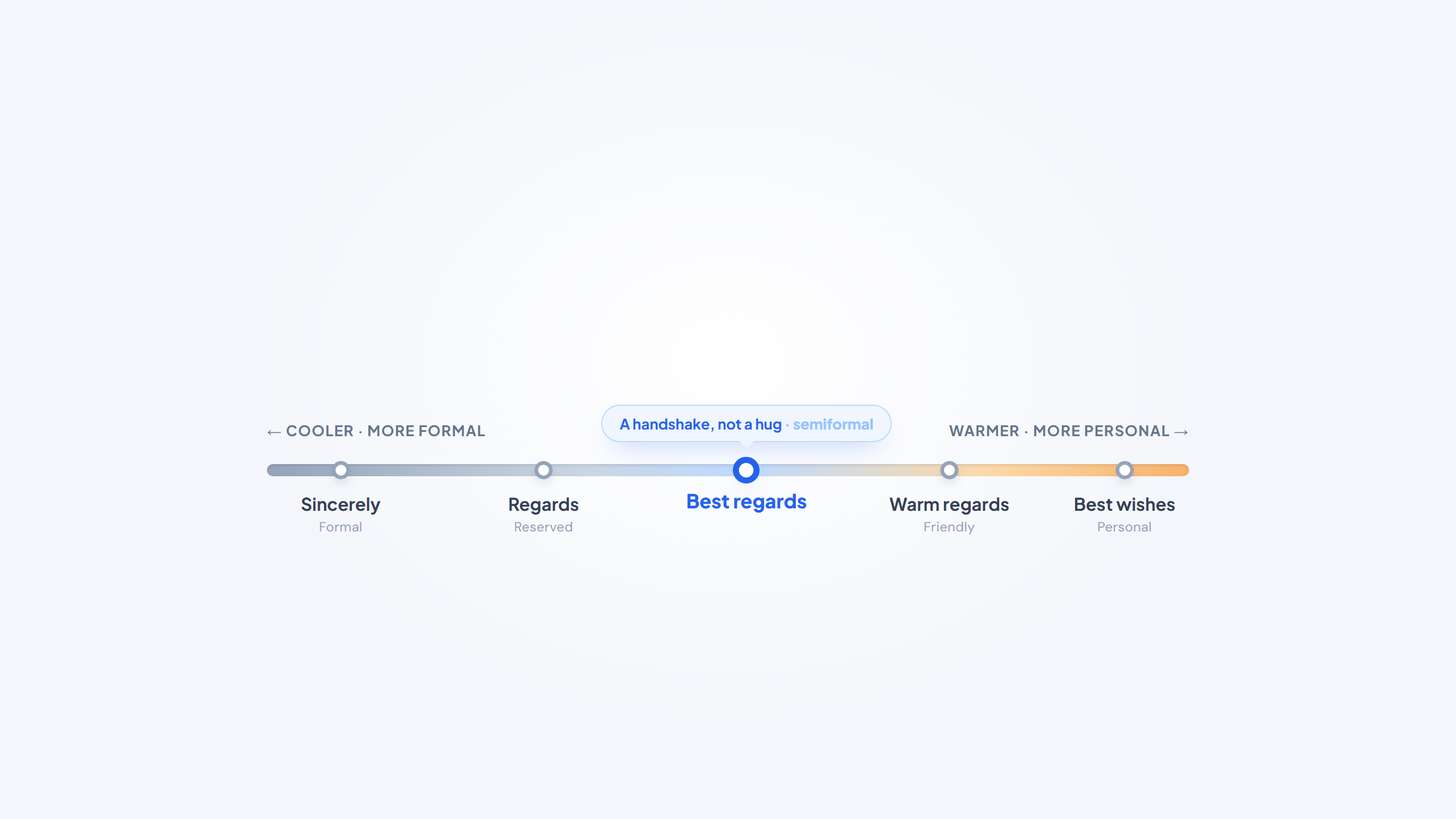
- 1"Best regards" is a semiformal sign-off that signals respect without claiming closeness, the email equivalent of a handshake rather than a hug, which is why it fits most professional email.
- 2In an email, capitalize only the first word ("Best regards,") and follow it with a comma; the all-caps "Best Regards" you see in Gmail autocomplete is a common convention, not a grammar rule.
- 3Use it once you have some working relationship or prior contact, and step up to "Sincerely" or "Respectfully" for cold first contact, conservative industries, or senior strangers.
- 4It's a solid, above-average closer, but before any sign-off does its job the email has to reach the right person, and our free Name2Email extension finds work emails inside Gmail so it does.
"Best regards" is the sign-off almost everyone reaches for and almost no one thinks hard about. It's safe, it's professional, and it fits so many situations that it's become the default close for client notes, cover-letter follow-ups, and everyday work email alike.
That ubiquity is exactly why it's worth understanding. Knowing what "best regards" actually signals, when it's the right call, when it quietly reads as too stiff or too final, and how to format it correctly, turns a reflex into a choice. This guide covers the meaning, the capitalization question people search for most, the comma, when to use it versus a warmer or cooler alternative, and how to build a complete best regards email around it.
We built Name2Email to find and confirm work emails right inside Gmail, so we think a lot about what makes a message land. The sign-off is the last thing your reader sees, and "best regards" is the one they see most.
What Best Regards Means in an Email
"Best regards" is a semiformal closing that combines two ideas: "best," as in best wishes, and "regards," which means to look on someone with respect or consideration. Put together, it's a polite way of saying "I wish you well and I respect you," without implying you're close.
The word carries some history. "Regards" traces back to the French verb regarder, to look upon or pay heed to, which is why closing with it reads as a small act of attention rather than a throwaway.
That middle position is the whole point. WiseStamp frames it neatly: "best regards" is a handshake, not a hug. It's warmer than a bare, formal "Regards" and cooler than an affectionate "Warm regards," which makes it the natural default for professional email where you want to be courteous without being familiar.
The close does more work than its size suggests, because it's the last thing the reader takes in. According to Microsoft's Work Trend Index, the average knowledge worker receives 117 emails a day and skims most of them in under a minute. In that flood, your sign-off is the final impression before the reader decides whether to reply, and a fitting one leaves the message feeling complete and considerate rather than abrupt.
So "best regards" isn't filler. It's a small signal of respect, aimed at people you have a working relationship with, and it's earned its spot as the most-used professional closer for a reason.
Is Best Regards Capitalized in an Email?
This is the single most-searched question about the phrase, and the honest answer has two layers: the rule, and what you'll actually see.
The rule, drawn from traditional letter etiquette, is to capitalize only the first word: "Best regards," not "Best Regards." Standard business-letter guidance treats the complimentary close as a mini-sentence, where you capitalize the first letter and lowercase the rest. By that standard, "Best regards," is correct and "Best Regards," is technically over-capitalized.
Real life muddies it. Gmail's autocomplete suggests "Best Regards" with both words capitalized, and some online courses even mark the sentence-case version wrong. Because the software people use every day title-cases it, the two-capital form is everywhere, and almost no reader will consider it a mistake.
The convention and the autocomplete disagree, and only one habit actually costs you anything.
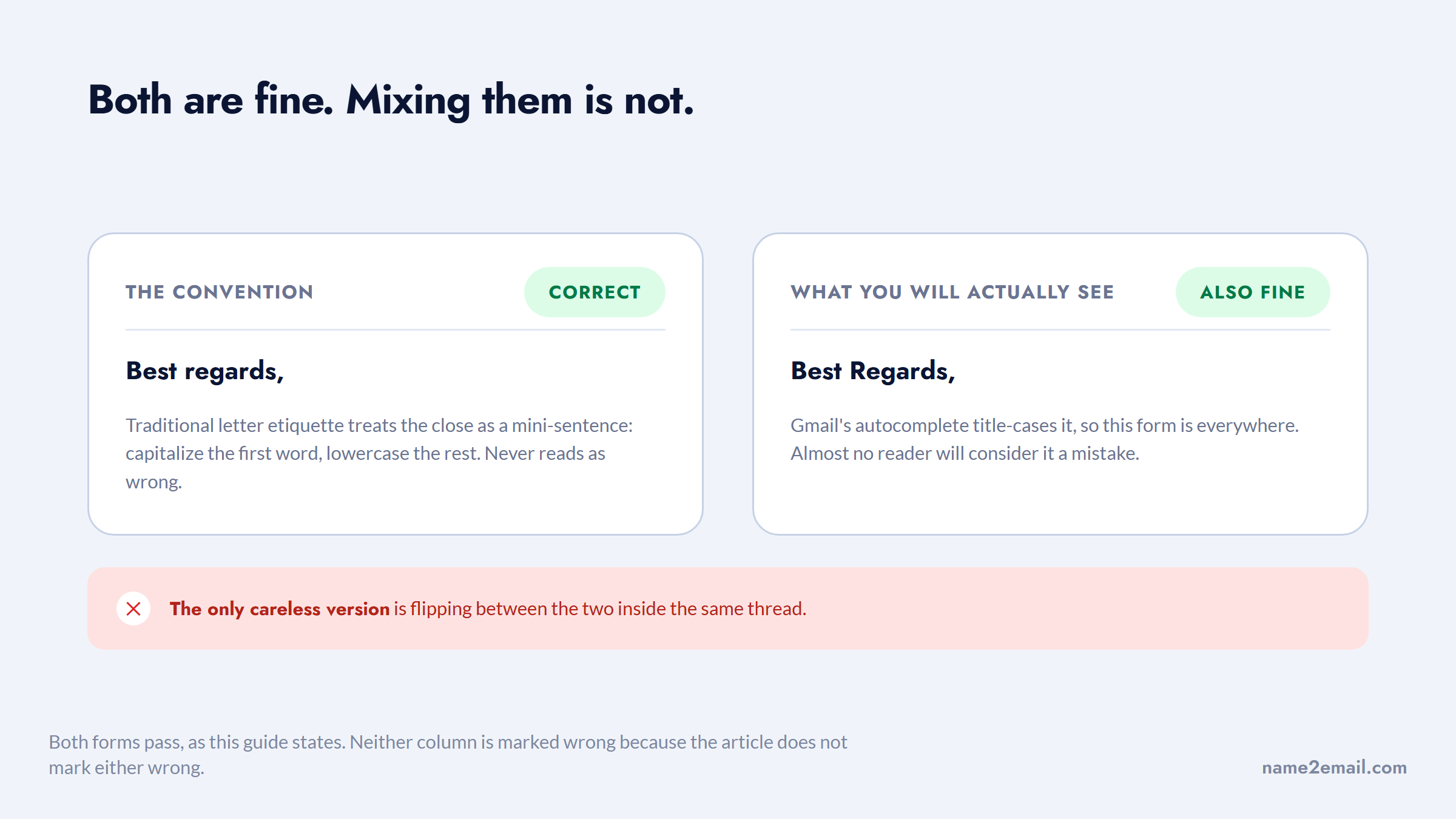
So here's the practical ruling. In an email, "Best regards," (first word only, with a comma) is the safe, correct default, and it never reads as wrong. "Best Regards," won't get you dinged in most workplaces, but if you want to follow the actual convention, capitalize the first word alone. Whichever you pick, be consistent within a message, since flipping between the two in the same thread is the only version that looks careless.
Do You Put a Comma After Best Regards?
Yes. The complimentary close always ends with a comma, then your name starts on the next line. It looks like this:
Best regards,
Jordan Lee
Grammarly and every etiquette source that addresses formatting agree on this: a comma after the sign-off, never a period, never nothing, and never an exclamation point in professional email. The comma signals that your name is the natural continuation of the closing phrase.
One small note for the whole block: leave a blank line between your last sentence and the sign-off, put the comma after "Best regards," and keep your name and signature details on the lines below. That spacing is what makes the close read as deliberate rather than tacked on.
When to Use Best Regards in an Email
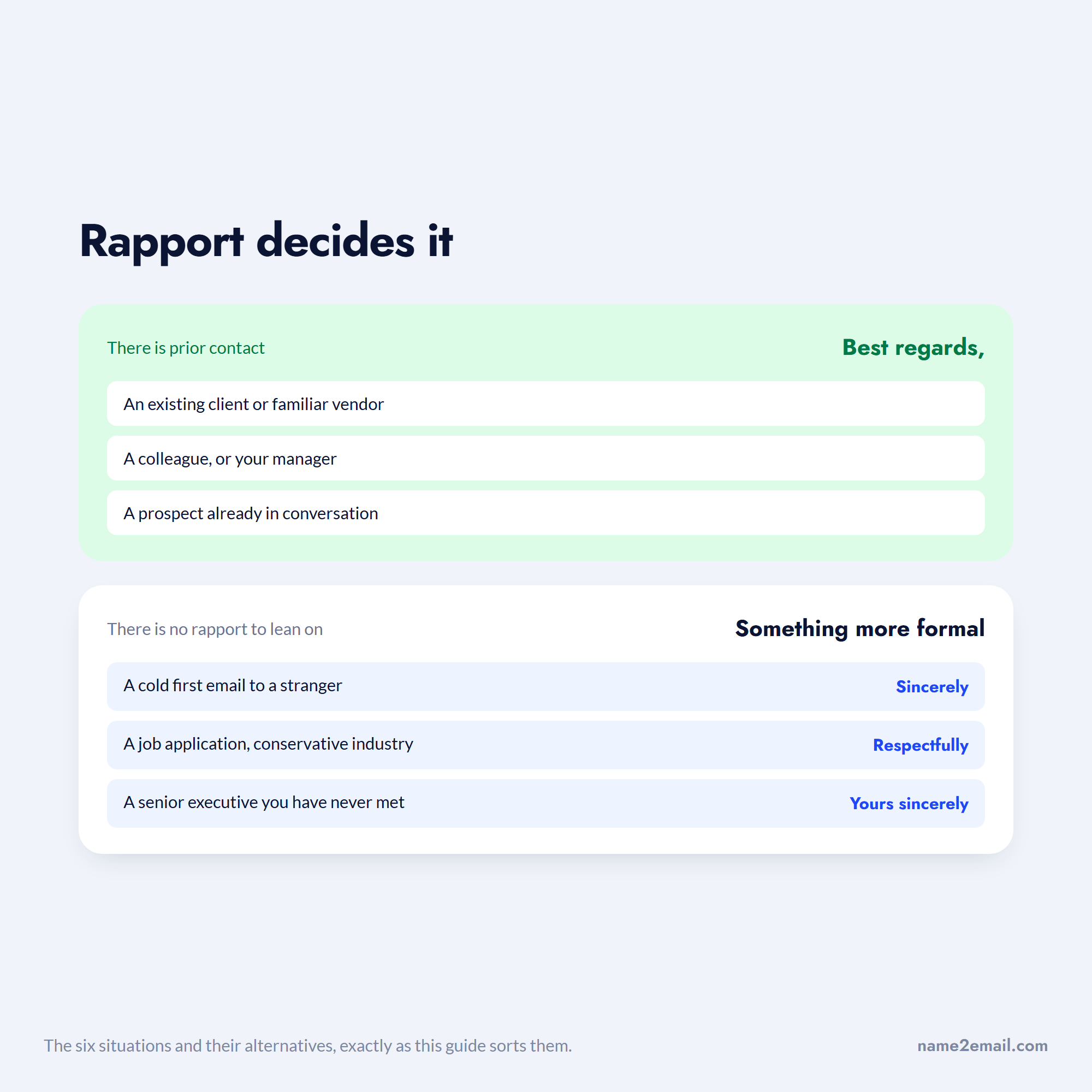
"Best regards" fits once there's already some working relationship or prior contact. It reads as respectful-but-familiar, which is right for people you're not meeting cold but aren't buddies with either. It's the wrong tool for a true first impression, where something more formal carries more credibility.
Use this quick read on the situation before you default to it.
Situation | Best regards? | Better fit if not |
|---|---|---|
Existing client or familiar vendor | Yes | None needed |
Colleague or your manager | Yes | None needed |
Prospect already in conversation | Yes | None needed |
Cold first email to a stranger | Risky | Sincerely, Yours sincerely |
Job application, conservative industry | No | Sincerely, Respectfully |
Senior executive you've never met | No | Respectfully, Yours sincerely |
The pattern is consistent across career-advice sources like Indeed and SEEK: "best regards" suits ongoing relationships, while cold outreach, formal applications, and first contact with senior people call for "Sincerely," "Yours sincerely," or "Respectfully," which sound more credible when you have no rapport to lean on.
Sorted by whether you have any history with the person, the six cases fall into two groups.
There's a regional wrinkle too. In the US, "best regards" is the professional workhorse and "kind regards" reads as slightly more formal. In the UK, Australia, and New Zealand, "kind regards" is more often the everyday default. If you're writing across the Atlantic, matching the register your recipient used first beats following any single rule.
Is Best Regards a Good Way to End an Email?
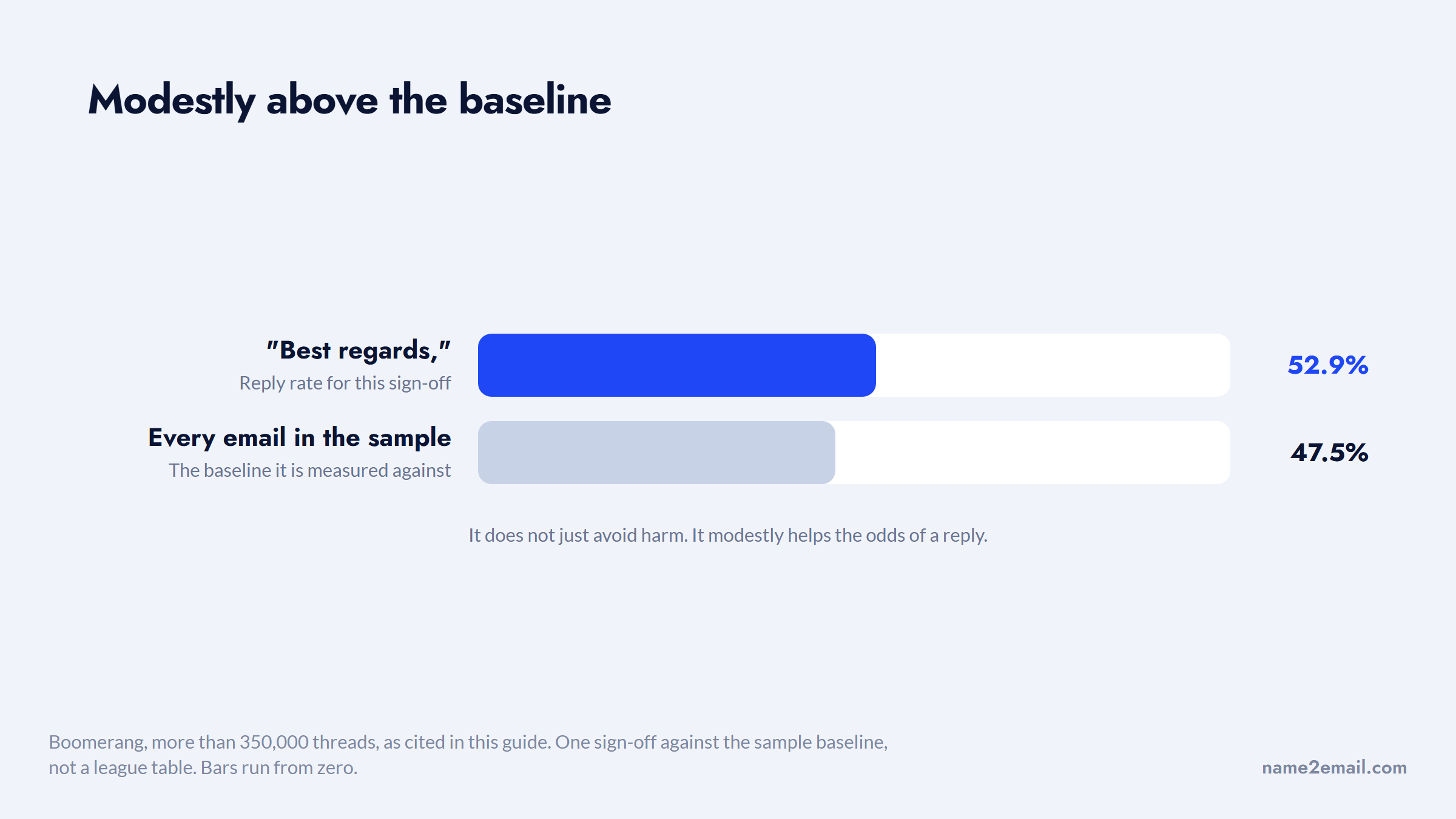
As a professional closer, yes, and there's data behind it. Boomerang analyzed more than 350,000 email threads and measured reply rates by sign-off. "Best regards" landed at a 52.9% response rate, above the 47.5% baseline for all emails in the sample. So it doesn't just avoid harm; it modestly helps your odds of a reply.
Against the average for every email in the sample, the edge is real but small.
The nuance is that gratitude closers beat it. In the same study, "thank you" hit 57.9% and "thanks in advance" topped the list at 65.7%. If your single goal is maximizing replies, a thank-you-based close outperforms "best regards." If your goal is a safe, respectful sign-off that fits almost anywhere, "best regards" is hard to beat.
Whether you think of it as a best regards email sign off or a best regards email closing, it does the same job: a respectful, low-risk way to end a message to someone you already work with.
Tone perception adds one more angle. On Reddit, professionals swapping notes on sign-offs described "best regards" as a polite way of saying "we're done here," a signal that the thread is wrapping up.
That makes it excellent for closing out a resolved conversation and slightly weaker for an email meant to open a new one. When you want to keep a discussion going, a warmer or more forward-looking close can serve better.
Best Regards vs Kind Regards, Regards, and Warm Regards
The "regards" family trips people up because the differences are subtle and the sources don't fully agree. Here's how the four most common variants line up.
Sign-off | Register | Use it for |
|---|---|---|
Regards | Formal, neutral, can read cold | Formal or unfamiliar recipients, wrapping up |
Best regards | Semiformal, safe default | Clients, colleagues, ongoing professional email |
Kind regards | Slightly more formal/reserved | First contact, thank-yous, a touch more polish |
Warm regards | Warm, personal | People you know well, softer or grateful notes |
The one genuine disagreement is whether "kind regards" or "best regards" is more formal. Most sources, including HubSpot, Salesforge, and SEEK, treat "kind regards" as equal to or slightly more formal than "best regards," so it's the marginally safer choice for first contact. A minority rank them the other way.
Set the two rankings side by side and the reason to stop looking for one is obvious.
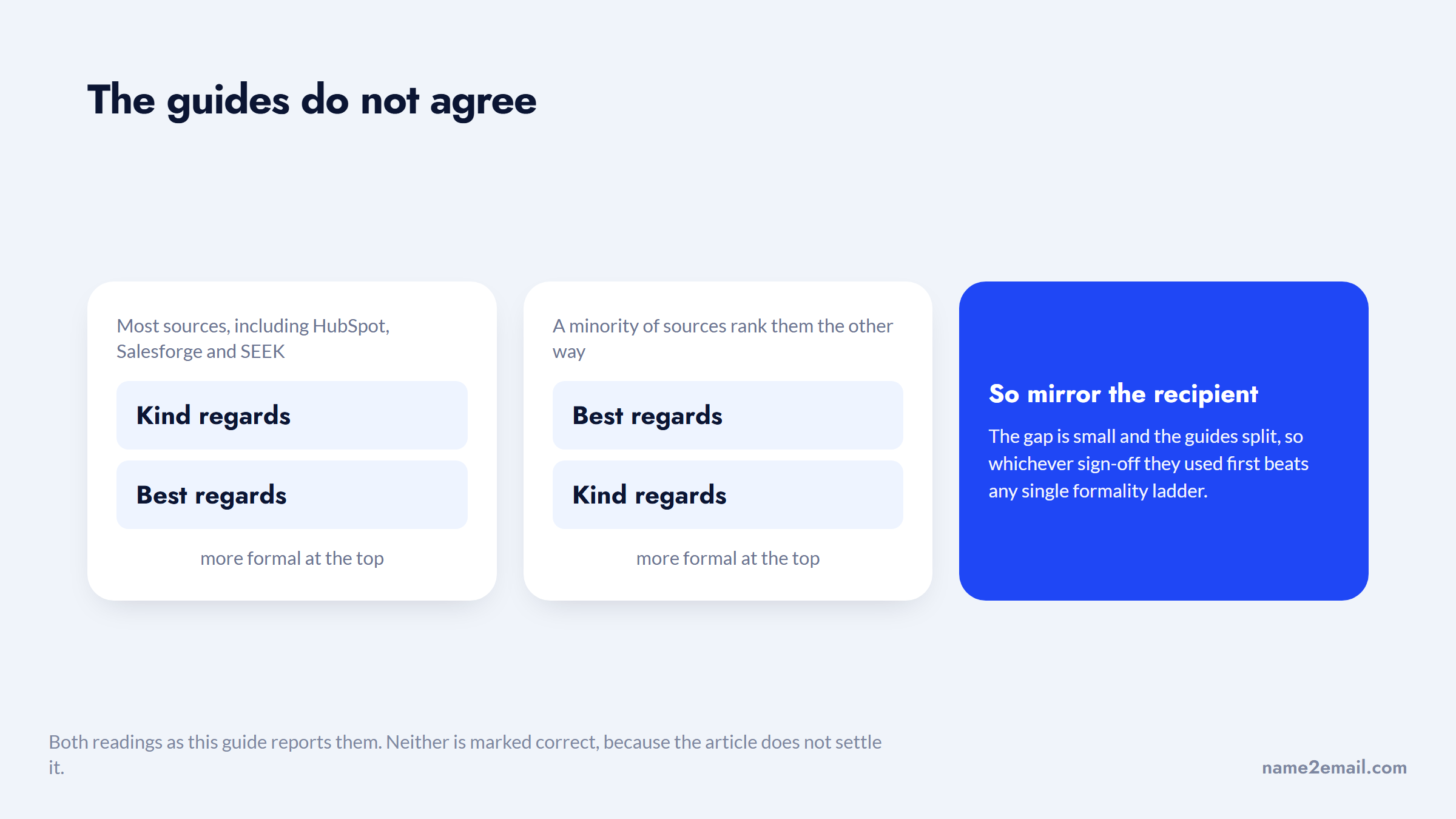
Because the gap is small and the guides split, the reliable move when you're unsure is to mirror whatever sign-off your recipient used, rather than trust any single formality ladder.
Bare "Regards" is the coldest of the group and can read as curt or even annoyed, while "Warm regards" is too personal for formal or first-contact email and belongs with people you already know. For the full menu of closings beyond the "regards" family, our guide to email closing salutations groups every option by register so you can match the tone to the moment.
Alternatives to Best Regards by Situation
"Best regards" is versatile, but it's not always the sharpest choice. Once you know the register you need, swapping in a better-fitting close is easy, and it keeps your email from sounding like a template.
Reach for a specific alternative when the situation calls for it:
- For a formal first email, a job application, or a senior stranger, use "Sincerely," "Yours sincerely," or "Respectfully."
- For a genuinely warm note to someone you know, use "Warmly," "Best wishes," or "With gratitude."
- For a teammate or a casual thread, "Thanks," "Cheers," or "Talk soon" feel more natural.
- When you want a reply, close with gratitude ("Thank you") or a clear next step ("Looking forward to your thoughts").
- To wrap up a resolved thread cleanly, plain "Regards" or "Best" does the job.
Perception varies more than any chart admits, which is worth keeping in mind. On Reddit, some professionals called "kind regards" old-fashioned or too stiff for a casual office, while others defended plain "Best" as unfairly maligned.
The lesson isn't to memorize a ranking; it's to read your actual workplace and the person you're writing to. When you want to engineer the whole close for a response, our guide on how to end an email covers the full sequence from last line to sign-off.
How to Write a Complete Best Regards Email
A best regards email is only as strong as the message above the sign-off. "Best regards" caps a message; it doesn't rescue a vague one. Here's how the pieces fit together.
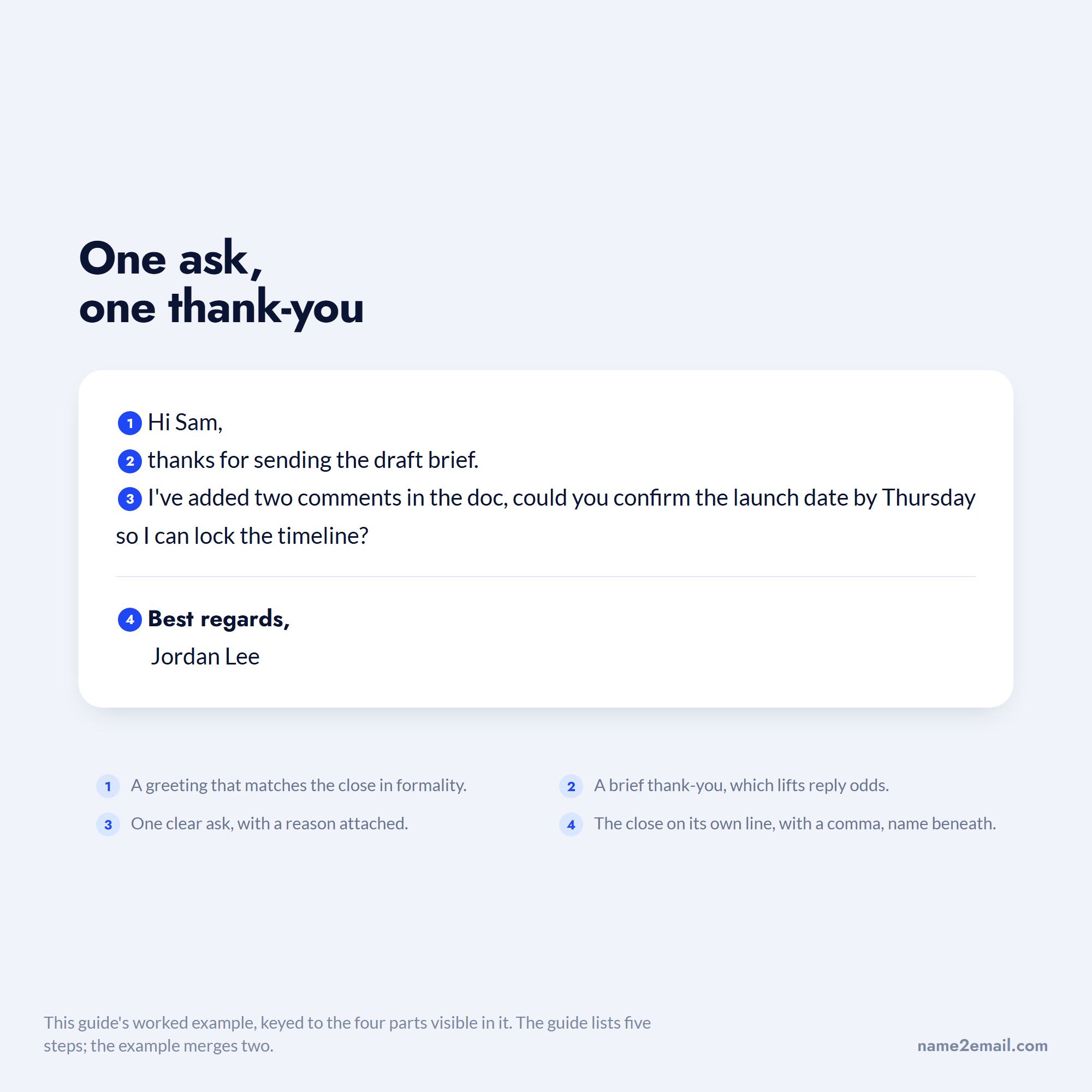
- Open with a greeting that matches the close in formality ("Hi Priya," or "Dear Ms. Alvarez,").
- Make your point in the first two sentences, since most readers skim.
- State one clear ask or next step, so the reader knows what to do.
- Add a brief thank-you if you're requesting something, which lifts reply odds.
- Close with "Best regards," on its own line, then your name and signature block.
A worked example ties it together. Suppose you're following up with a client contact: "Hi Sam, thanks for sending the draft brief. I've added two comments in the doc, could you confirm the launch date by Thursday so I can lock the timeline? Best regards, Jordan Lee." It's short, it has one ask, it thanks the reader, and the close fits the working relationship.
Broken into its parts, the whole message is doing four jobs and no more.
The one thing "best regards" can't fix is a message that never arrives. Before you polish the wording, make sure the email reaches a real person: our free Name2Email extension surfaces likely work-email patterns as you compose in Gmail and confirms the right one by recognition.
It's honest about its limits, pattern-based and best on corporate domains, so we frame it as finding the most likely address, not guaranteeing every one. If you're starting from just a name, our guides on how to find an email address and how to look up an email address cover the free ways to get it, then a quick verify an email address check confirms it's real before you send.
Common Mistakes With Best Regards
The phrase is forgiving, but a few habits make it work against you. Most are small and easy to fix once you notice them.
- Using it for cold first contact, where "Sincerely" or "Respectfully" reads as more credible.
- Flipping between "Best regards" and "Best Regards" in the same thread, which looks careless.
- Dropping the comma or adding an exclamation point, both of which undercut the professional tone.
- Pairing a formal "Best regards," with a bare first name when the context calls for your full name and title.
- Reaching for the overly familiar "My best," which experts at the University of Maryland's Smith School of Business flag as saccharine.
- Defaulting to it on every email until it reads as a template, when a warmer or more specific close would serve.
Fixing these is mostly about matching the close to the moment: formal enough for the recipient, consistent within the message, and paired with a signature that carries the same weight. Get that alignment right and "best regards" does exactly what it should, quietly.
Make Best Regards Work for You
A good best regards email earns its keep because the closing is respectful, versatile, and safe almost everywhere. Capitalize the first word, add the comma, and put best regards at the end of an email once you have a working relationship, stepping up to "Sincerely" for cold or formal first contact and toward gratitude when you want a reply.
The sign-off is the easy part, though. The email still has to reach the right inbox and say something worth replying to. Add Name2Email to Chrome to find work emails inside Gmail for free, then close with "best regards" and know the message is landing where it should. If you're prospecting at any scale, our guides to the best email finding tools and the best cold email software compare the finders and senders worth using.
Frequently asked questions
"Best regards" is a semiformal sign-off meaning, roughly, "I wish you well and I respect you." It combines "best" (best wishes) with "regards" (respect or consideration). It signals courtesy and professional respect without implying a close personal relationship, which is why it works as a default close for clients, colleagues, and familiar contacts. Think of it as a handshake rather than a hug.
The traditional rule is to capitalize only the first word: "Best regards,". That follows business-letter etiquette, which treats the close like a short sentence. In practice, Gmail's autocomplete and some course materials use "Best Regards" with both words capitalized, so you'll see that version constantly and almost no one treats it as an error. Either is accepted; just stay consistent within a message.
Use it once you have a working relationship or prior contact: existing clients, familiar vendors, colleagues, your manager, or a prospect already in conversation. Avoid it for cold first emails, job applications in conservative fields like law or finance, and first contact with senior executives you don't know, where "Sincerely," "Yours sincerely," or "Respectfully" reads as more credible.
Yes. In Boomerang's analysis of over 350,000 threads, emails closing with "best regards" got a 52.9% reply rate, above the 47.5% average. It's a safe, professional choice that slightly helps your odds of a response. If maximizing replies is your only goal, gratitude closers like "thank you" (57.9%) or "thanks in advance" (65.7%) perform even better, so match the close to whether you want safe-and-neutral or reply-maximizing.
It depends on the register. For more formal or first-contact email, use "Sincerely" or "Respectfully." For warmer notes to people you know, use "Warmly," "Best wishes," or "With gratitude." For casual threads, "Thanks," "Cheers," or "Talk soon" fit. And when you want a reply, a gratitude close or a clear next step ("Looking forward to your thoughts") tends to outperform a neutral sign-off.

We build Name2Email, the free Chrome extension that finds work emails inside Gmail. We write about outreach, prospecting, and getting more replies.
Connect →