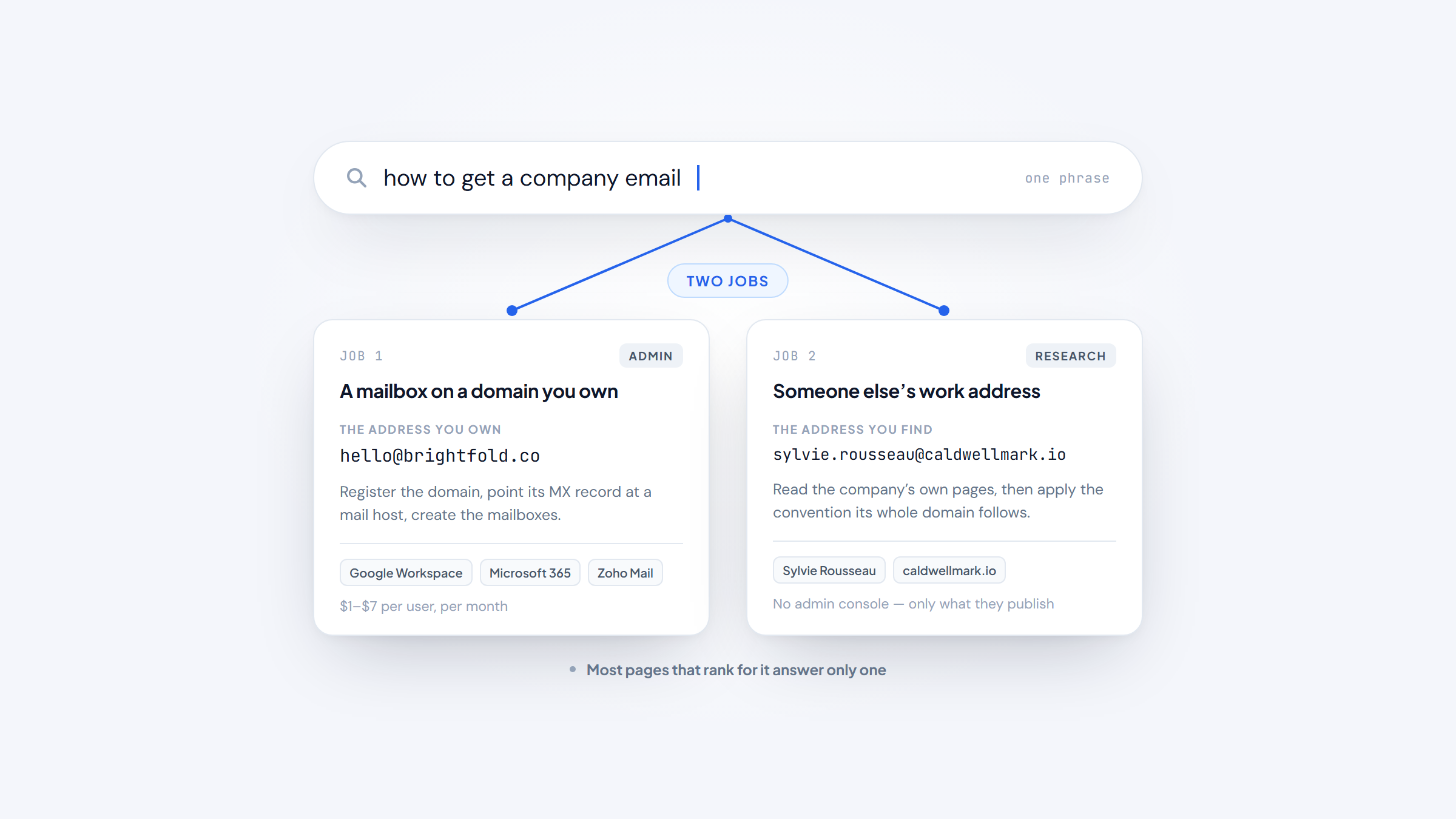
- 1The phrase hides two jobs: setting up a company mailbox for your own business, and finding a named person's work address at another company.
- 2To run your own, register a domain and host the mail with Google Workspace, Microsoft 365, or Zoho Mail, from about $1 to $7 per user per month.
- 3To find someone else's, read the company's own pages, infer the address pattern from the domain, then confirm the candidate in Gmail before you send.
- 4Name2Email finds a single work address in Gmail at no cost, but it works from naming patterns and cannot promise that every address will resolve.
Two people type the same search: how to get a company email. One runs a small business and wants jane@acme.com instead of a personal Gmail address. The other sends cold email and needs the work address of a named person at acme.com.
The phrase points at two different jobs, and most pages that rank for it answer only one. That mismatch is why the search ends in frustration so often. A business owner lands on a cold-email tool, or an SDR lands on a domain-registration page.
This guide answers both. First, how to get a company email account for your own business, along with the address formats companies use. Then how to get a company email address for someone else, the outreach job, with the methods that work and the limits of each.
What "Getting a Company Email" Actually Means
A company email is a mailbox on a domain the company controls, like jane.doe@acme.com, rather than a freemail address like jane.doe@gmail.com. That one definition covers both readings, and the only thing that changes is who owns the address.
In the first reading, you are the company. You want your own mailbox on your own domain so your messages stop looking improvised. The work is administrative: register a domain, choose a mail host, create the mailboxes.
In the second reading, the company belongs to someone else. You want the work address of a person who works there, so you can reach them directly instead of guessing or filling in a contact form. The work is research, and it turns on the naming conventions a company follows.
Two more readings ride along on the same search. Some people want to email a company to ask for free stuff, and some want to stop a company from emailing them. Both names use the words "company email," so both are covered here.
How to Get a Company Email Account for Your Business
Setting up your own company email is a two-part job. You own the domain, then you run the mail on it. Neither step is expensive, and the answer to how to get a company email for free is usually just the domain fee, which runs about $10 to $15 a year.
The reason to bother is trust. A message from jane@acme.com reads as a business, while the same message from jane.acme.consulting88@gmail.com reads as a hobby and lands in spam more often, because the free domain carries no reputation of its own.
Register the Domain First
Everything starts with a domain, because the part to the right of the @ has to be yours. Most small businesses register through a registrar such as Namecheap or Cloudflare, and a common dot-com usually runs $10 to $15 a year.
Three checks save a rebuild later:
- Confirm the exact name is free, and avoid a spelling that sits one letter from a bigger brand, since that invites typos and legal problems.
- Pick the shortest spelling people will actually type, and skip hyphens where you can.
- Keep the registrar account in the company's name, not a personal login, so you do not lose the domain when someone leaves.
Once you own the domain, you point its mail records at whichever host you choose. That record, the MX record, is what makes jane@acme.com deliverable rather than decorative.
Choose Where the Mail Runs
You have two families of choice, and only one of them is worth the effort. A dedicated email host gives you a mailbox on your domain that syncs across phone and desktop, while running your own mail server is possible and almost never sensible, since deliverability and spam filtering are full-time work.
Three hosts cover most small teams: Google Workspace, Microsoft 365, and Zoho Mail. The figures below are per user, per month, read from each provider's pricing page in October 2026.
Host | Cheapest business email plan | Entry price (per user, monthly) | What you get |
|---|---|---|---|
Google Workspace | Starter | $7 (promo lower for 3 months) | Gmail, Calendar, Drive, 30 GB pooled storage |
Microsoft 365 | Business Basic | $7 paid yearly | Outlook, Teams, 1 TB cloud storage |
Zoho Mail | Mail Lite | $1 annual | Custom domain email, 5 GB storage, no monthly plan |
Google's Starter and Microsoft's Basic both list at $7 per user per month, so the tie usually breaks on which suite your team already uses. Zoho is the budget route when a mailbox and a domain are all you need.
One trap is worth naming before you pick. In an r/smallbusiness thread on the cheapest way to get a business email, the top reply warned against the half-finished email service many web hosts bundle in, and pointed the poster to a dedicated host instead. That advice holds up: the mail is the thing you are buying, so buy it from a company whose product is mail.
Prices change, so read each provider's own page before you commit. Whichever host you choose, the mailbox sits on your domain, which means the address travels with you if you move later.
Create the Mailboxes and Pick a Format
With the domain and host in place, you create mailboxes from the host's admin console. The host walks you through verifying the domain, setting the mail records, and adding the first user, and the whole thing usually takes minutes rather than days.
Decide the format before you add people, because switching later means reissuing everyone's address and asking contacts to update their records. The next section covers the options, and the short version is that first.last@ scales best as a team grows.
The Address Formats Companies Follow
Almost every company picks one address format and applies it to the whole domain, which is the convention the second reading of this query depends on. The format decides how the company builds jane.doe@acme.com, and it rarely changes once people have cards to reprint.
The patterns below cover the large majority of business addresses you will meet.
Format | Example | Where it shows up |
|---|---|---|
first.last@ | jane.doe@acme.com | Larger companies, the common professional default |
flast@ | jdoe@acme.com | Mid-size teams, keeps the address short |
firstlast@ | janedoe@acme.com | Some companies, with no separator |
first@ | jane@acme.com | Small teams, where first names rarely clash |
role@ | sales@, info@, press@ | Shared inboxes a team monitors, not one person |
The pattern tends to track company size. A ten-person team has room for first@ because few names collide, while an enterprise defaults to first.last@ to keep thousands of addresses readable at a glance.
Role addresses matter for a different reason. A mailbox like sales@acme.com or press@acme.com belongs to a team rather than a person, so it will not reach the individual you are trying to contact. Treat it as a route around the gate rather than a door.
The choice is not settled even inside IT teams. In a long r/sysadmin thread on address formats, admins split between flast@ and first.last@, and one flagged that firstl@ collides once a company grows.
The lesson for finding someone is simpler than the debate: whatever format a company picked, it applied it everywhere, which is why the idea behind searching Google for email starts with knowing the shape of the address.
How to Get a Company Email Address for Someone Else
Now the second reading, and the one this guide spends the most time on. You know the company, you know the person, and you need their address. You might be an SDR, a founder, a recruiter, or a link builder, and the address is the last thing between you and the message.
This is the job we built Name2Email for. Our extension, made by the team at Reply.io, lives inside Gmail, costs nothing to use, and turns a person's name plus their company domain into a shortlist of likely addresses. There is no account to create and no credit meter to watch.
Three methods get you to an address, and they stack rather than compete. You read the company's own pages, you infer the pattern from the domain, and you confirm the candidate in Gmail. None is reliable alone, but together they turn a name and a domain into a working address.
If the person keeps a LinkedIn profile, start there for the raw material. The profile hands you the exact company domain, which is all a pattern-based finder needs, and the route from a profile to an address is the one we set out in finding email from LinkedIn.
Read the Company's Own Pages First
The company's own site is the source most people skip, and it is free, public, and trustworthy. A team page, a contact page, or a press release often publishes one real address that reveals the pattern for the whole domain in a single glance.
Work through the pages in this order:
- Open the Contact page and look for any named address, not only info@.
- Check the Team or About page, where bios sometimes list direct addresses.
- Read the most recent press release or news post, since media contacts are often named people.
- Look for the person on a conference bio, a webinar listing, or a podcast page.
- Note the domain's format the moment you see one named address, and apply it to everyone else.
A single named address does two jobs. It gives you one confirmed contact, and it tells you the company's format, so you can build the pattern for anyone else there. The catch is coverage, because many companies publish only role addresses, and a role address says nothing about the personal pattern.
Getting the domain right matters more than it sounds, since a wrong domain is a guaranteed bounce, which is the sort of thing company research tools settle before you spend time guessing addresses.
Infer the Pattern From the Domain
Once you know the domain's format, you can build a likely address for any named person at that company. This is pattern inference, and it is the reason one published address is worth more than an hour of clicking.
The mechanics are simple. Take the first and last name, apply the pattern you found, and you have a candidate. At a company on flast@, Maria Ferrer becomes mferrer@acme.com. At one on first.last@, she becomes maria.ferrer@acme.com.
What you cannot do is stop there. A guessed address is a hypothesis, not a fact, and sending to a raw guess is how a sending domain collects bounces. The best email finding tools do the same inference at scale and then check each candidate against the domain's mail server, so the guess is tested before it costs you anything.
Pattern inference also gives you a fast way to read a domain you have never seen. If two executives at a company share a format, the third almost certainly does too, which is enough to build a short list of candidates for the person you actually want.
Confirm the Address in Gmail Before You Send
A candidate becomes a real address when you confirm it, and Gmail offers a free way to do exactly that. Type the address into the To field, and if Gmail recognizes it, it surfaces the person's name and photo next to it.
That is the confirm-by-hover step, and it is the core of how our extension works. Paste a name and the company's domain into the compose box, and we lay out the candidate addresses for you. Hover over one, and Gmail reveals the contact details it already holds, so the addresses it recognizes stand out. How it works walks the whole sequence in a few steps.
What you get from that hover is a confirmation, not a guarantee. Gmail only recognizes addresses that already exist in its own contact graph, so a candidate it does not know may still be real, and a known one may still be stale. The step narrows the field; it does not close it.
The direction also matters. Confirming that jane.doe@acme.com belongs to Jane Doe is forward finding, while starting from an address and asking who owns it is the reverse job, which is what a reverse email lookup covers.
Where Each Finding Method Stops Working
Every method above has a real limit, and knowing them keeps you from trusting a guess that was never going to land. A pattern is a strong lead, and it is not a promise.
A correct pattern can still miss for four reasons:
- Name collisions, where two people share a format and one gets a number or middle initial appended.
- Exceptions, where a long-tenured employee keeps an old address that ignores the convention.
- Personal domains, where the employee works from a Gmail address and no company pattern exists to apply.
- Role-only companies, where the site publishes sales@ and nothing personal at all.
Personal mail is the clearest limit for pattern-based finding. If the person works from a Gmail or Outlook address, there is no corporate pattern to infer, and no tool can build the address from a name and a domain. Our feature set is built for corporate domains for that reason.
We say this plainly because it is how Name2Email behaves. It is pattern-based, so it is strongest on company domains and it will not catch every address. When none of the suggestions resolve, the honest read is that this person is not findable this way, and you are better off learning that while composing than from a bounced send.
How to Email a Company to Get Free Stuff
The people searching how to email a company to get free stuff are customers, not sellers, so this task works nothing like outreach. You are trying to reach a brand as a shopper, often to ask for a sample, a replacement, or a giveaway.
Pick the inbox that matches the ask. Customer service handles a problem with an order, marketing or PR handles a giveaway or a collaboration, and a named community contact is the best option when the company publishes one.
Then say what you want in the first two lines, and give a reason worth forwarding, whether that is an audience, a review, or a genuine complaint. A note that reads "send me free stuff" gets deleted, while one that names a product, a reason, and a small ask gets passed along.
Keep the request small and specific. The team reading it can approve a sticker, a sample, or a discount far more easily than a crate of product, and a first yes often opens the door to a second.
How to Stop Getting Emails From a Company
When you search how to stop getting emails from a company, the law is on your side. The FTC's CAN-SPAM guide requires every commercial email to include a clear way to opt out, and it requires the sender to honor that request within 10 business days.
The fastest route is the one already in the message. Use the Unsubscribe link at the bottom, and skip replying "stop," because replies often reach an inbox nobody monitors. If the link is broken, report the message as spam, and report a repeat offender to the FTC at ReportFraud.ftc.gov.
Two things surprise people here. Unsubscribing from a marketing list does not always stop transactional mail like order confirmations, because the law treats those as a separate category. And a sender that ignores your opt-out is not merely annoying, since CAN-SPAM violations carry penalties up to $53,088 per email.
Check the Address Before You Hit Send
Whichever reading brought you here, the last step is the same: confirm before you send. For your own domain, that means a mailbox that syncs and a signature that matches your brand. For a found address, it means a candidate that resolved in Gmail and a domain that actually accepts mail.
An address can look right and still fail, because a valid format and a live mailbox are two different tests.
The format itself is narrow, defined by the standard as a local part, an at sign, and a domain, with dots used carefully and no spaces, a shape that RFC 5322 sets out in full. A correctly shaped address still fails when the domain has a typo, the mailbox was closed, the server accepts every address as a catch-all, or the address belongs to a team rather than a person.
For anything you plan to send at volume, run the list through address verification checks first, because a batch of unconfirmed guesses is exactly what damages a sending domain. A verified list also protects the part you cannot replace, which is your ability to land in an inbox at all.
Setting up your own company email and finding someone else's are two ends of the same idea: an address on a real domain is what makes a message count. One you control builds trust on your side, and one you find opens a door on theirs.
If the finding half is where you get stuck, that is what we built Name2Email for. It costs nothing, it never leaves your inbox, and it gives you a shortlist you can confirm before you write a word.
We are a finder, not a database, so we will not hand you a list, but we do make the last step faster. Add to Chrome and turn your next name into an address.
Frequently asked questions
The domain is the only part you must pay for. The cheapest route runs about $1 per user per month through Zoho Mail's Lite plan, after a domain that costs roughly $10 to $15 a year. You cannot get a real company email on your own name without owning the domain, so a free @gmail.com address will never look like a company one.
Read the company's own pages first for any named address, infer the format from the domain, then confirm each candidate in Gmail's To field. Name2Email does the inference and hover step inside Gmail for free, and it is honest about the gap: it works from patterns, so it is strongest on corporate domains and cannot guarantee every address.
Use first.last@company.com unless you have a reason not to, because it scales as the team grows and reads clearly. Smaller teams often keep first@ for simplicity, and companies of any size use role addresses like sales@ or info@ for shared inboxes. Pick one convention and apply it everywhere.
Find the inbox that matches your ask, such as customer service for an order issue or marketing for a giveaway, then state what you want and why you are worth it in the first two lines. Keep the request small and specific, and give the team something to pass along, because a specific reason gets forwarded and a vague request gets deleted.
Use the Unsubscribe link at the bottom of the message, and give the sender the 10 business days that CAN-SPAM allows to process it. If the link fails, mark the message as spam, and report a sender that keeps ignoring you to the FTC. Unsubscribing from marketing does not usually stop order confirmations and other transactional mail.

We build Name2Email, the free Chrome extension that finds work emails inside Gmail. We write about outreach, prospecting, and getting more replies.
Connect →