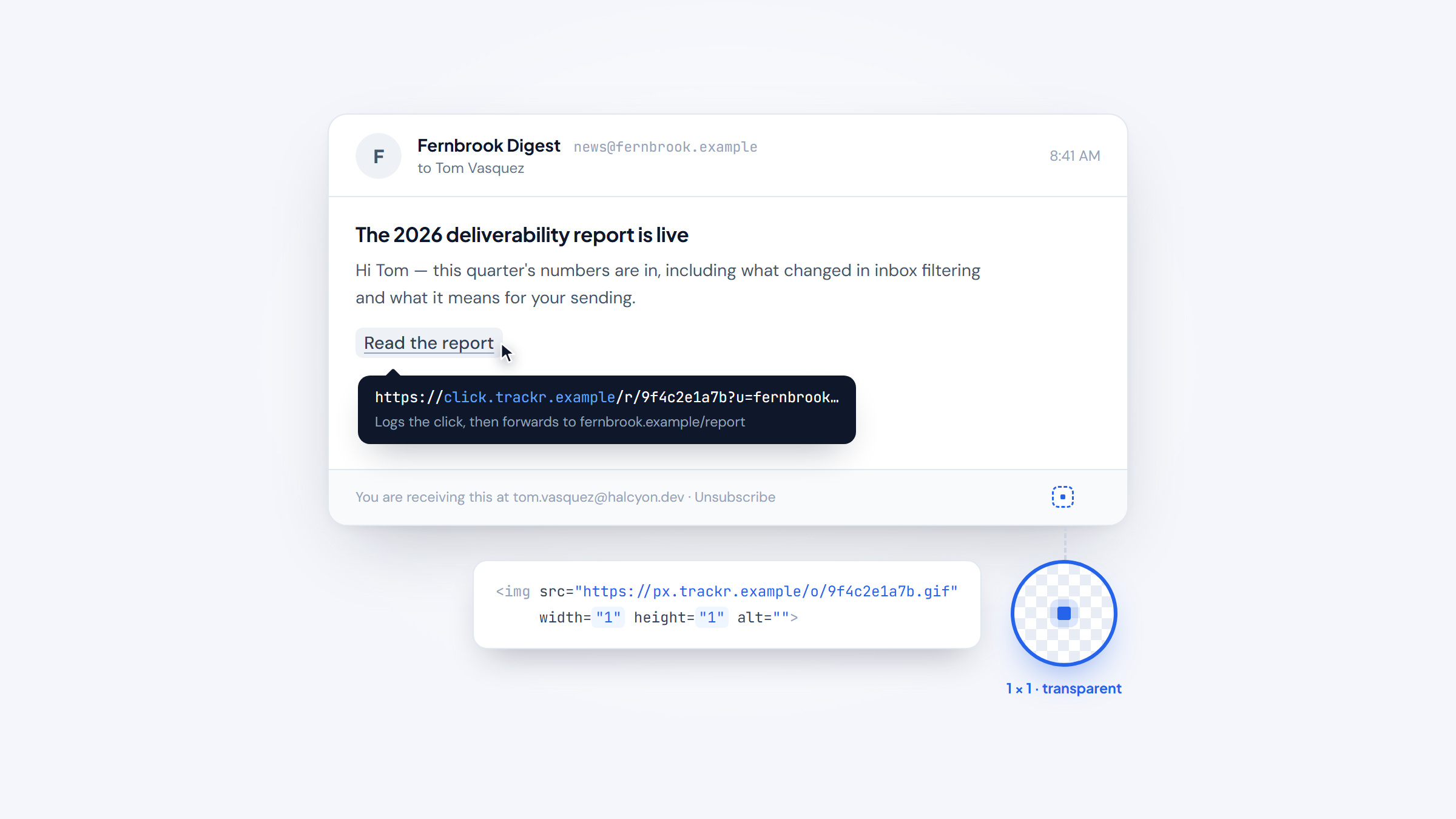
- 1Email tracking works through a 1x1 invisible image and rewritten links. When your client loads the image, the sender learns you opened it.
- 2Open rates have become close to meaningless. Apple's Mail Privacy Protection preloads images on delivery, so an "open" often means nothing happened.
- 3Princeton researchers found about 30% of commercial emails leak the recipient's address to third parties simply on viewing.
- 4Blocking tracking takes one setting: stop your email client from loading remote images automatically.
There is a small piece of infrastructure inside a large share of the email you receive, and most people have never been told it exists.
It is an image one pixel square, transparent, usually invisible against any background. When your email client loads it, a request goes to a server that records the moment, roughly where you were, and what device you used.
This guide explains how that works, why the data it produces has degraded badly, which tools do it, and how to switch it off if you are on the receiving end. Both audiences are here on purpose, because the mechanics are the same either way.
We make Name2Email, a free Chrome extension for finding work emails in Gmail. We do not sell tracking, which makes this easier to write honestly.
How Email Tracking Actually Works
Two mechanisms do nearly all of it, and neither is sophisticated.
The first is the tracking pixel. The sender embeds an image tag pointing at a URL with a unique identifier for you and for that specific message. Your email client loads images, that request hits the sender's server, and the server logs it as an open. The image is transparent and one pixel across so you never notice it.
The second is link rewriting. Instead of linking directly to a destination, the sender links to a redirect on their tracking domain, which logs the click and then forwards you on. This is why hovering a link in a marketing email often shows an unfamiliar domain.
A third, less common method embeds a remote CSS file or web font, which achieves the same thing when the client fetches it.
Everything else in tracking is reporting built on those signals.
What Tracking Can and Cannot See
The gap between what people fear and what actually gets recorded is wide in both directions.
Signal | Visible to sender? | How it is captured |
|---|---|---|
That the message was opened | Yes, unreliably | Pixel load |
Time of the open | Yes | Server timestamp |
Number of opens | Yes, inflated | Repeated pixel loads |
Approximate location | Sometimes | IP address at load time |
Device and email client | Usually | User-agent string |
Which links you clicked | Yes | Rewritten redirect URLs |
Whether you actually read it | No | Not measurable |
What you typed or replied privately | No | Not accessible |
Forwarding to a colleague | Partially | New opens from a different IP |
The important line is the third one from the bottom. Tracking records that a client loaded an image, which is not the same as a human reading anything.
That distinction used to be a technicality. It is now the whole story.
Why Open Rates Stopped Meaning Anything
Two developments broke open tracking, and most reporting has not caught up.
The first is Apple. Mail Privacy Protection routes messages through Apple's proxy and, in Apple's own words, hides your IP address so senders cannot determine your location or link it to your other online activity. Critically, remote content is downloaded privately in the background when the message arrives rather than when you view it.
The consequence is direct: for Apple Mail users with the setting on, every message gets marked as opened whether or not anyone looked at it, and the location data is Apple's proxy rather than the recipient.
The second is automated scanning. Corporate security systems open messages and click every link before delivery to check for malware.
Practitioners hit this constantly. A thread in r/Emailmarketing described dormant subscribers appearing as the most engaged on a list because scanners were opening and clicking everything, which corrupted segmentation. The workaround people shared was a honeypot: hide an invisible link near the footer, and label anything that clicks it as a bot. One reply noted their platform now filters bot clicks and reports them separately. You can read the thread on Reddit, treating it as practitioner experience rather than measured research.
One logged open used to have one explanation; now it has three you cannot tell apart.
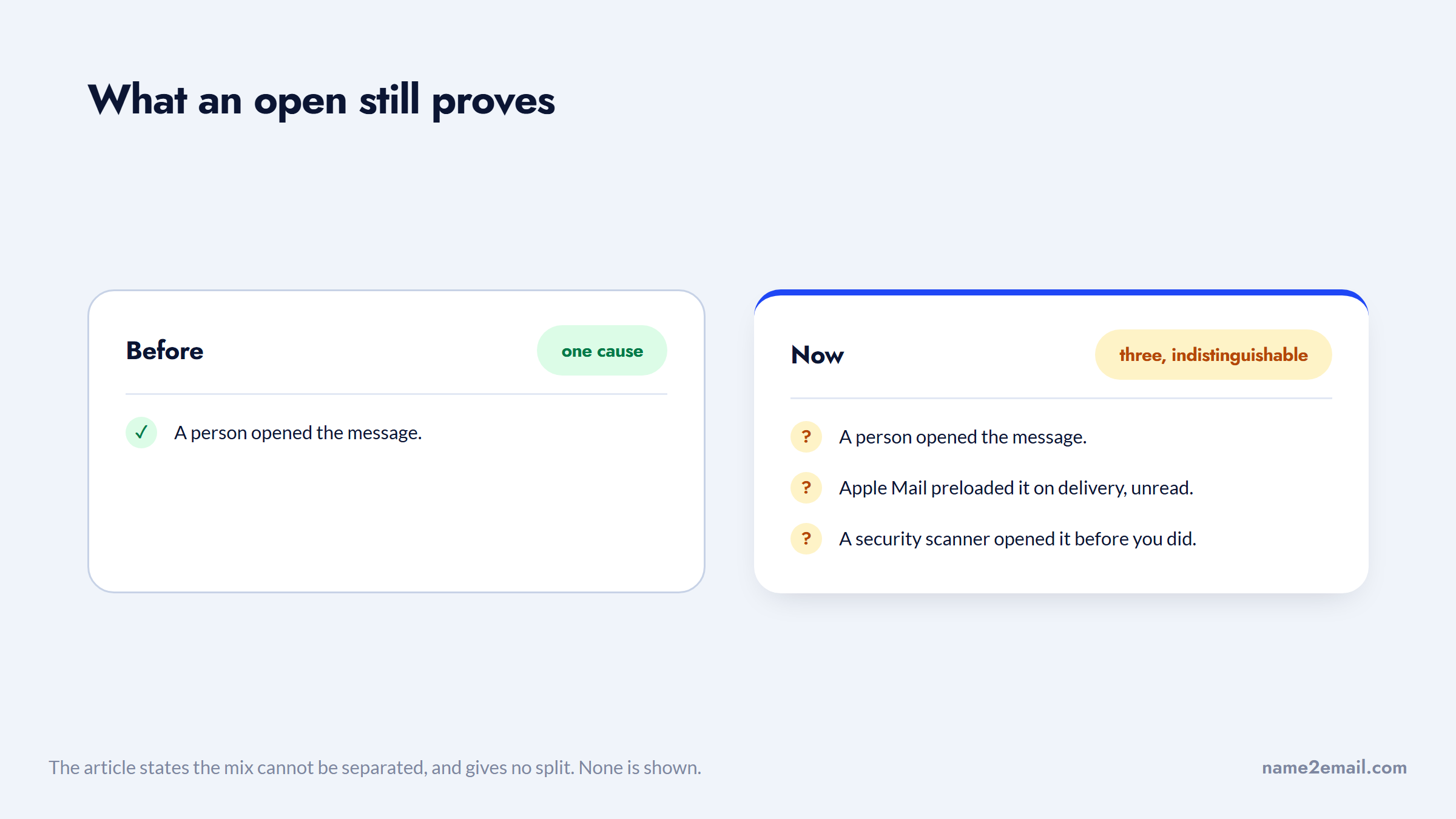
Between the two, an open rate today is a blend of real humans, Apple preloads, and security robots, and you cannot separate them from the headline number.
Email Tracking Tools Comparison
If you still want tracking for the signals that remain useful, this email tracking software comparison covers the mainstream options with pricing verified in 2026. Each is a sales email tracking tool as much as a marketing one, since the same pixel serves both.
Tool | Free tier | Paid from | Tracking scope | Best for |
|---|---|---|---|---|
Mailsuite (formerly Mailtrack) | Yes, unlimited tracked emails, first open only | EUR4.99/user/month | Opens, links, documents | Individual Gmail users |
Streak | Yes, email and link tracking included | $49/user/month annually | Opens, links, inside a CRM | Solo sellers running a pipeline in Gmail |
HubSpot Sales Hub | Free tools for up to 2 users | $7/seat/month | Opens, clicks, logged to CRM | Teams already on HubSpot |
Mixmax | Yes, after the 14-day trial | $29/user/month annually | Opens, clicks, sequence engagement | Gmail-native sales workflows |
Reply.io | No, 14-day trial only | $49/user/month annually | Full sequence-level engagement | Multichannel outbound at volume |
Note that Mailsuite prices in euros rather than dollars, and that it rebranded from Mailtrack, so older comparisons still use the previous name.
For a genuinely free option, Mailsuite's free plan and Streak's free tier both include tracking indefinitely, which is unusual in a category that normally treats it as a paid feature.
How to Stop Email Tracking and Block Email Tracking
To block email tracking you need one setting, not a suite of tools, because a single change handles the bulk of it.
Stop your email client from loading remote images automatically. Without the image load, the pixel never fires, and the sender learns nothing.
In Gmail
Open Settings, then See all settings. On the General tab, find Images and select "Ask before displaying external images." Save at the bottom of the page.
Gmail proxies images through Google's servers by default, which already hides your IP address from senders. Switching to ask-first stops the open being recorded at all.
In Apple Mail
On iPhone or iPad, open Settings, go to Apps then Mail, tap Privacy Protection, and turn on Protect Mail Activity. On a Mac, the equivalent sits in Mail settings under Privacy.
This is the strongest default of any mainstream client, because it both hides your IP and decouples image loading from your actually opening the message.
In Outlook
Outlook blocks external images by default in most configurations. If yours does not, the setting sits in File, Options, Trust Center, Trust Center Settings, Automatic Download, where you enable "Don't download pictures automatically in standard HTML email messages."
For Links
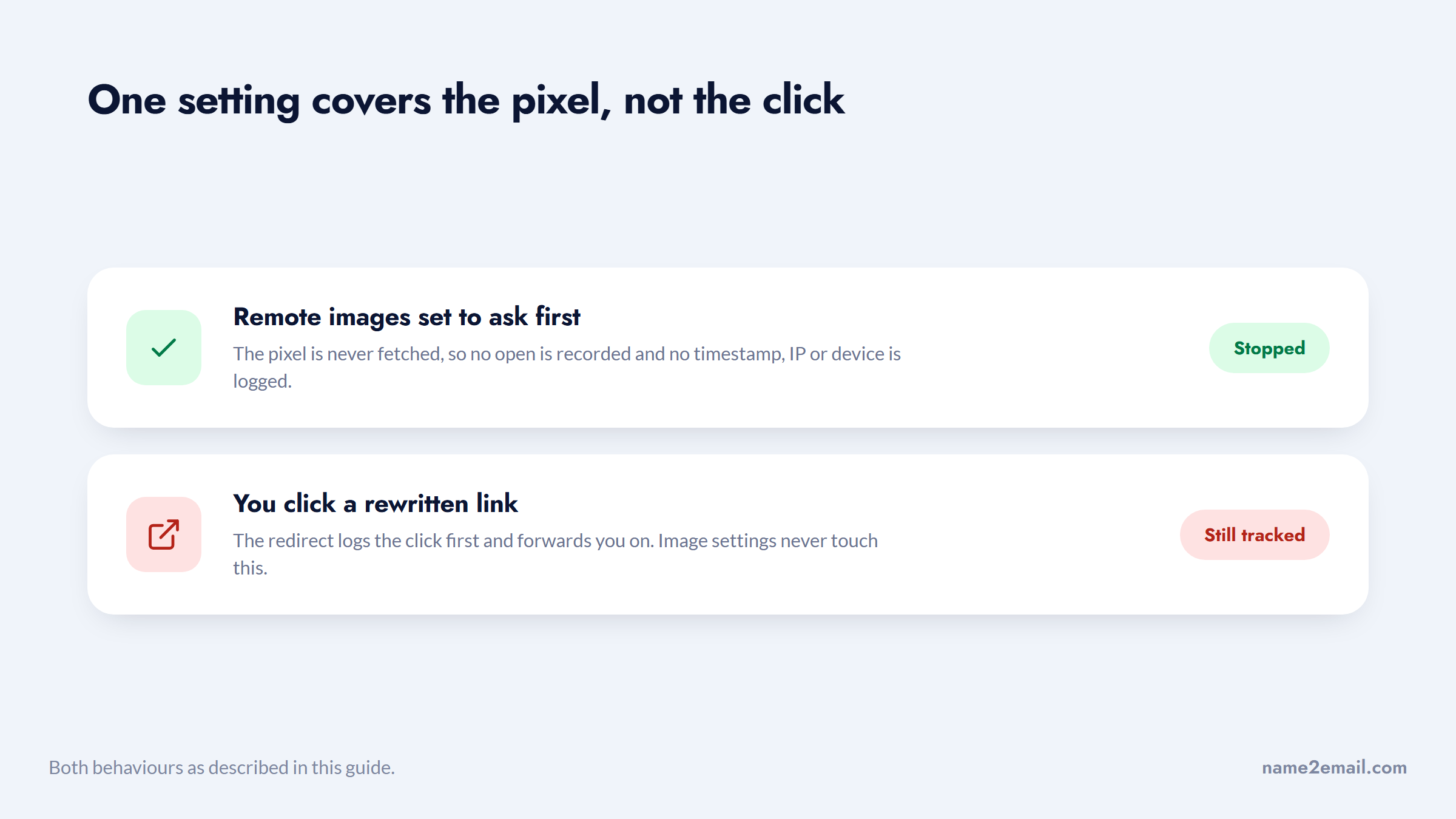
Image blocking does not stop click tracking, since that fires only when you click a rewritten link. If you want to avoid it, hover the link, read the real destination in the status bar, and type it in directly.
The image setting closes one of the two doors, and leaves the other open.
Browser extensions that strip tracking pixels exist too, though the image setting covers most of the exposure with no extra software.
How to Tell Whether an Email You Received Is Tracked
You can check any individual message in under a minute, without installing anything.
The most direct route is to view the raw source. In Gmail, open the message, click the three-dot menu, and choose "Show original." In Outlook, open the message and look for View, then Message source. Then search that text for `img` tags.
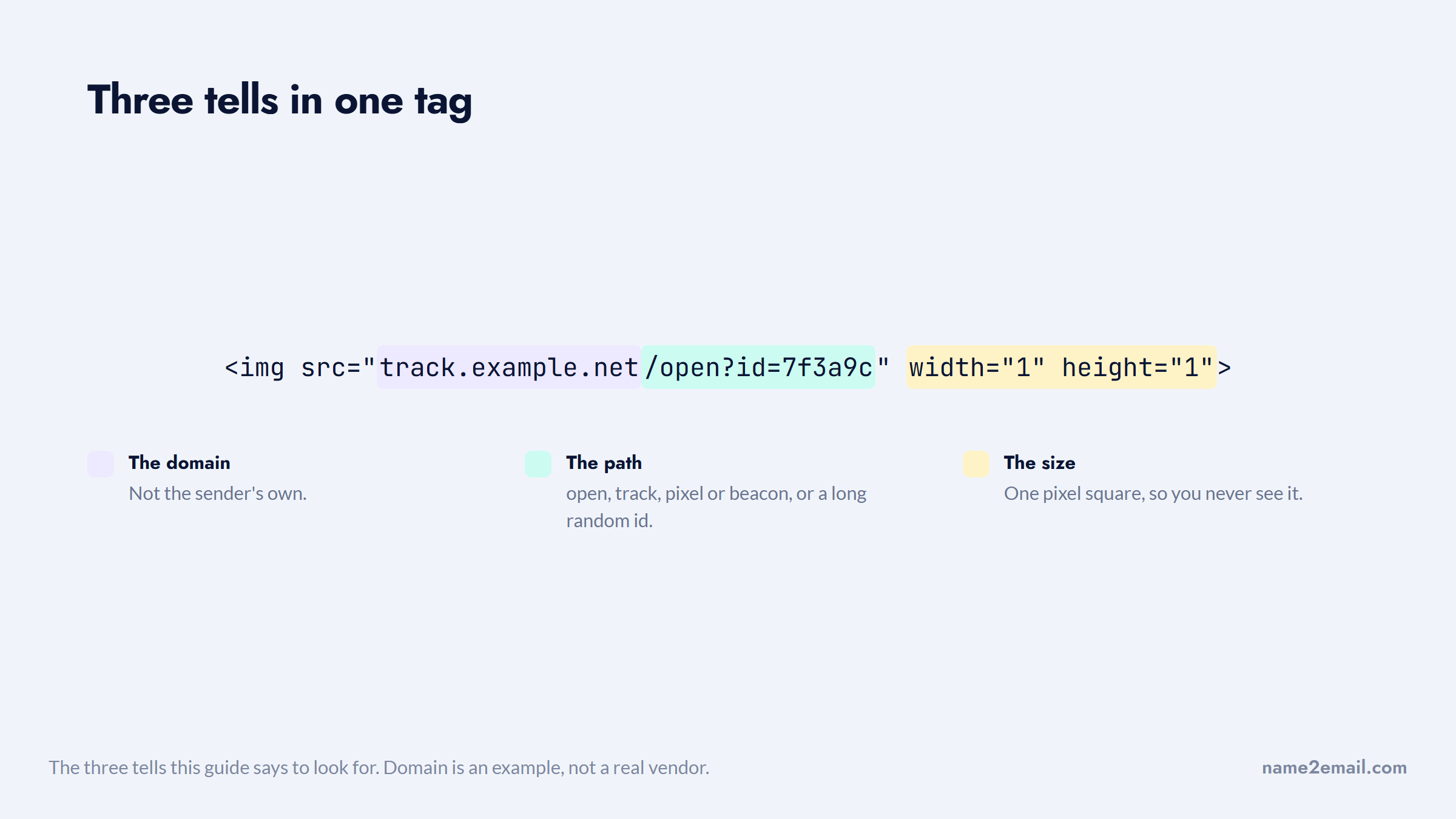
What you are looking for is an image tag whose dimensions are 1x1, or whose URL sits on a domain that is not the sender's. Tracking pixels usually give themselves away in the URL: `open`, `track`, `pixel`, `beacon`, or a long random identifier string are all common.
All three tells sit in a single tag, which is what makes them quick to spot.
Link rewriting is even easier to spot without opening the source. Hover any link and read the destination in your browser's status bar. If the link text says one thing and the actual URL points at a tracking domain before redirecting, that click is being logged.
There is a simpler heuristic for most people. If your client is asking whether to display images in a message, that message almost certainly contains remote content, and remote content in a commercial email is usually there partly to track you. That prompt is the system working as intended.
Worth keeping in perspective: finding a pixel does not mean the sender is doing anything unusual. Nearly every marketing platform includes tracking by default, so its presence tells you the sender used normal software rather than that they targeted you specifically.
The Privacy Question Is Bigger Than Opens
The reason to care is not really that a sender learns you read their email.
Princeton researchers Englehardt, Han and Narayanan studied commercial mailing-list email and found that about 30% of emails leak the recipient's address to one or more third parties when viewed. Opening a message can trigger requests to parties you have no relationship with, and the address is a persistent identifier in a way a cookie is not.
The sender is rarely the only party that hears about it.
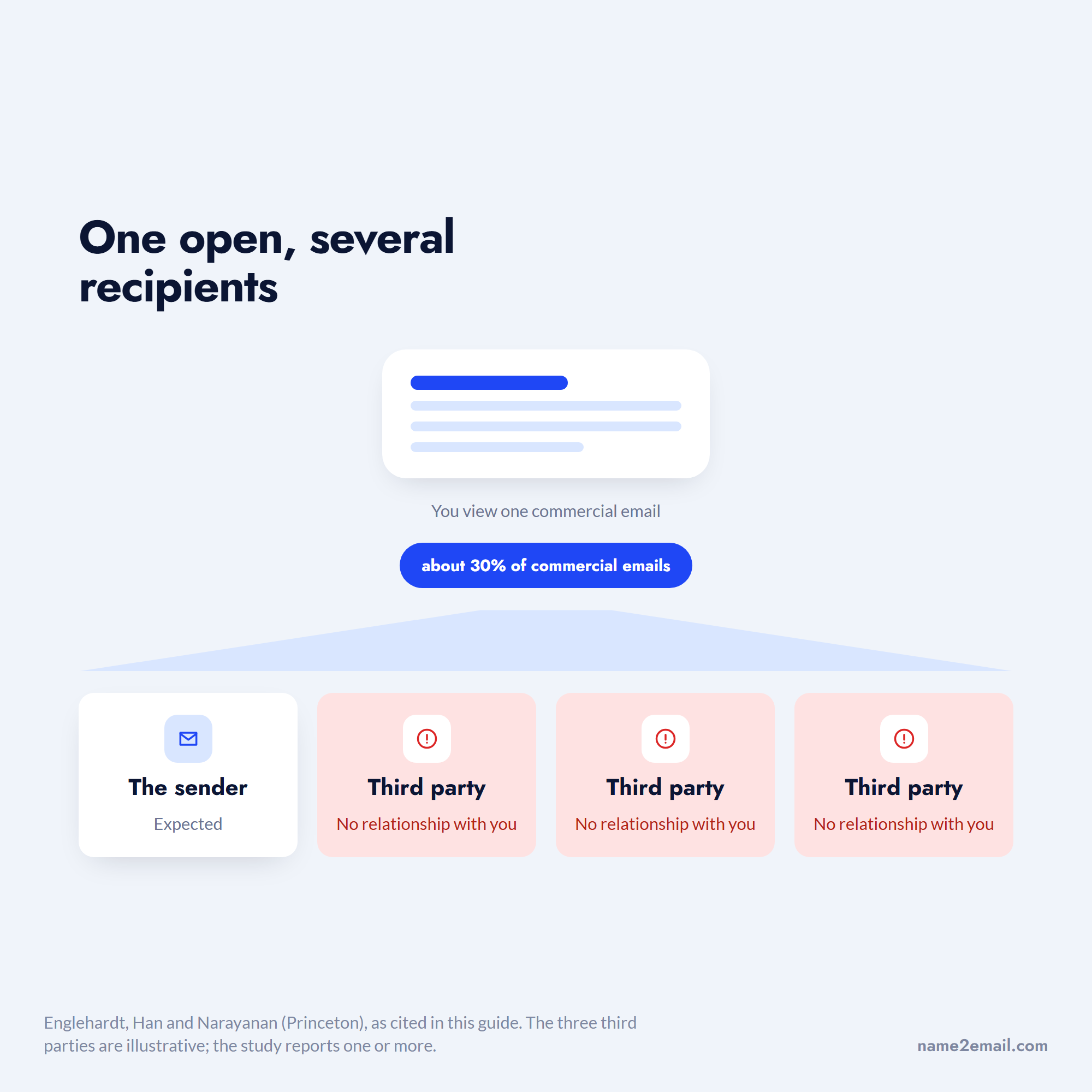
That is the meaningful difference. A cookie is pseudonymous and can be cleared. An email address is stable across devices, browsers, and years, so linking it to browsing behavior is a durable identification rather than a temporary one.
Whether that concerns you is a personal judgment. What is worth knowing is that the exposure comes from third-party content in the message, not from the sender's own open counter.
What to Measure Instead
If open rates are compromised, the practical response is to demote them rather than abandon measurement.
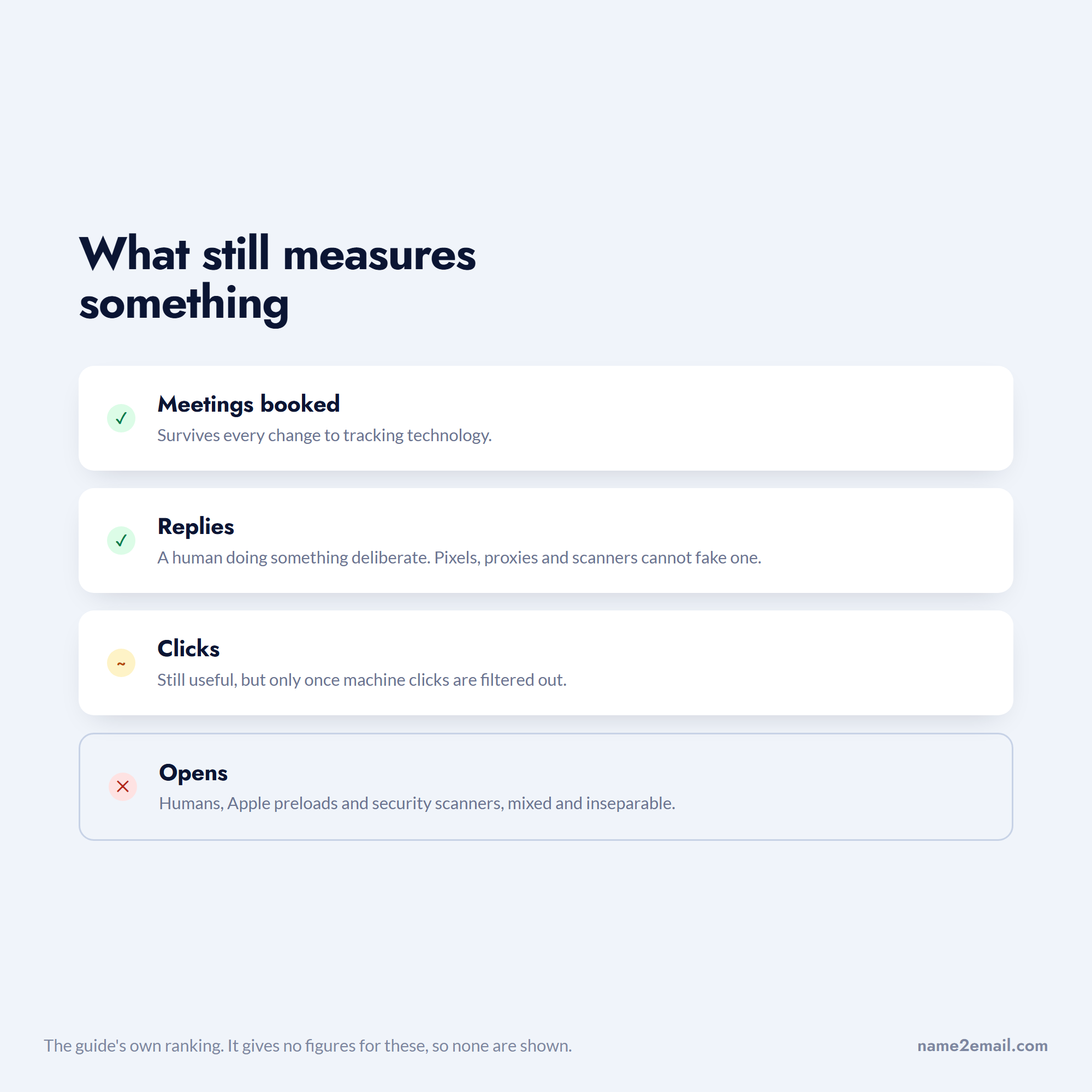
Replies are the honest metric for outreach, and they are unaffected by pixels, proxies, and scanners. A reply is a human doing something deliberate.
Clicks retain some value, provided you filter bot activity, and most serious platforms now separate machine clicks from human ones.
Meetings booked, or whatever your real conversion event is, is the only number that survives every change to tracking technology.
Ranked by how much of the signal survives, the order is not the one most dashboards lead with.
There is a reporting habit worth breaking alongside this. Comparing your open rate against a published industry benchmark is now meaningless, because you do not know what share of either number is Apple preloads and security scanners. Benchmarks built from mixed sources cannot tell you anything about your own audience.
Open rate still has one legitimate use: comparing a segment against itself over time, where the same distortions apply on both sides. Treat it as a directional signal within a consistent audience, never as an absolute measure of attention, and never as a reason to declare a subject line a winner.
Our roundups of the best cold email software and email outreach tools note which platforms handle reply detection well, which matters more than their tracking dashboards.
Does Tracking Hurt Deliverability?
It can, and this is rarely mentioned by the tools that sell it.
Link rewriting is the bigger factor. Rewritten links point at a tracking domain rather than your own, and if that domain is shared across many senders, its reputation is not fully in your control. A shared tracking domain that other customers have abused can drag your messages down with it. Using a custom tracking domain on your own subdomain avoids that, and most serious platforms support it.
The pixel itself adds a remote image to a message that might otherwise be plain text, and image-to-text ratio is one of many signals filters consider. For cold outreach in particular, a plain-text message with no tracking often lands better than a tracked HTML one.
The practical trade-off for cold email is worth stating plainly: you are exchanging deliverability for open data that Apple and security scanners have already made unreliable. For many outbound teams, turning open tracking off and measuring replies is now the better deal.
Where Tracking Sits in an Honest Workflow
Tracking tells you what happened after you sent. It does nothing about whether you sent to the right place.
That earlier step is our part. Name2Email finds work emails inside Gmail: type a name and company domain in the compose window, we generate the likely formats, populate the "To" field, and you confirm by hovering, since Gmail displays the person's name and photo when it recognizes an address. Free, unlimited, no account.
We are honest about the boundary. We generate patterns from public naming conventions rather than a scraped database, we work best on corporate domains, and we cannot guarantee every address. We also do not track anything about the emails you send.
Before a campaign, verifying addresses does more for your results than any tracking configuration will. Our guide on verifying an email address covers the check, and the best email verification tools compares the tools for bulk work.
A Sensible Position on Both Sides
If you send email, turn tracking on if you like, but stop reporting open rates as though they measure attention. Judge campaigns on replies and conversions, and tell whoever asks for open-rate reporting why the number moved for reasons unrelated to your copy.
If you receive email, switch remote images to load on request. It takes a minute in any client, it costs you nothing except clicking "display images" occasionally, and it removes most of the exposure described above.
The one thing worth avoiding on both sides is treating tracking as a moral question. Senders who insist open rates prove engagement and recipients who treat every pixel as surveillance are both overreading a mechanism that mostly just reports whether an image loaded.
Neither position requires outrage. Tracking is a normal part of email infrastructure that happens to have become much less informative than the dashboards suggest.
If your next step is sending rather than measuring, add Name2Email to Chrome to get the addresses free, or check what it costs first. For sending to many people individually rather than as a tracked campaign, emailing multiple recipients individually covers the method, and cold email follow-ups covers what to do when nobody replies.
Frequently asked questions
Senders embed a transparent image one pixel square, hosted on a tracking server with a unique identifier for you and that message. When your email client loads images, the request hits the server and is logged as an open, along with a timestamp, your IP address, and your device type. Links are separately rewritten to pass through a redirect that logs clicks before forwarding you on. Both methods depend entirely on your client loading remote content.
Turn off automatic loading of remote images. In Gmail, go to Settings, General, Images, and choose "Ask before displaying external images." On iPhone, open Settings, Apps, Mail, Privacy Protection, and enable Protect Mail Activity. Outlook blocks external images by default in most configurations. This stops pixels firing but not click tracking, so also hover links to check their real destination rather than clicking rewritten ones.
Yes, and the free email tracking tools here are unusually capable. Mailsuite, formerly Mailtrack, has a free plan with unlimited tracked emails, though history is limited to the first open. Streak includes email and link tracking in its free tier permanently. HubSpot's free tools cover tracking for up to two users. Paid tiers of each email tracking service start around EUR4.99 per user monthly for Mailsuite and $7 per seat for HubSpot Sales Hub. Free tracking is more available here than in most software categories.
They can tell that your email client loaded an image, which is not the same thing. If you use Apple Mail with Mail Privacy Protection, images are preloaded when the message arrives rather than when you open it, so you may be logged as having opened something you never saw. Corporate security scanners also open messages before delivery. If remote images are blocked in your client, the sender gets no open signal at all.
In the US, tracking commercial email is generally lawful provided the message complies with CAN-SPAM on identification, subject lines, and opt-out. In the EU and UK, tracking that stores or accesses information on a device sits under ePrivacy rules alongside data protection law, and regulators there have treated it more strictly than US law does. Rules in this area are being actively revisited, so if you send into Europe, take current legal advice rather than relying on a general guide.

We build Name2Email, the free Chrome extension that finds work emails inside Gmail. We write about outreach, prospecting, and getting more replies.
Connect →