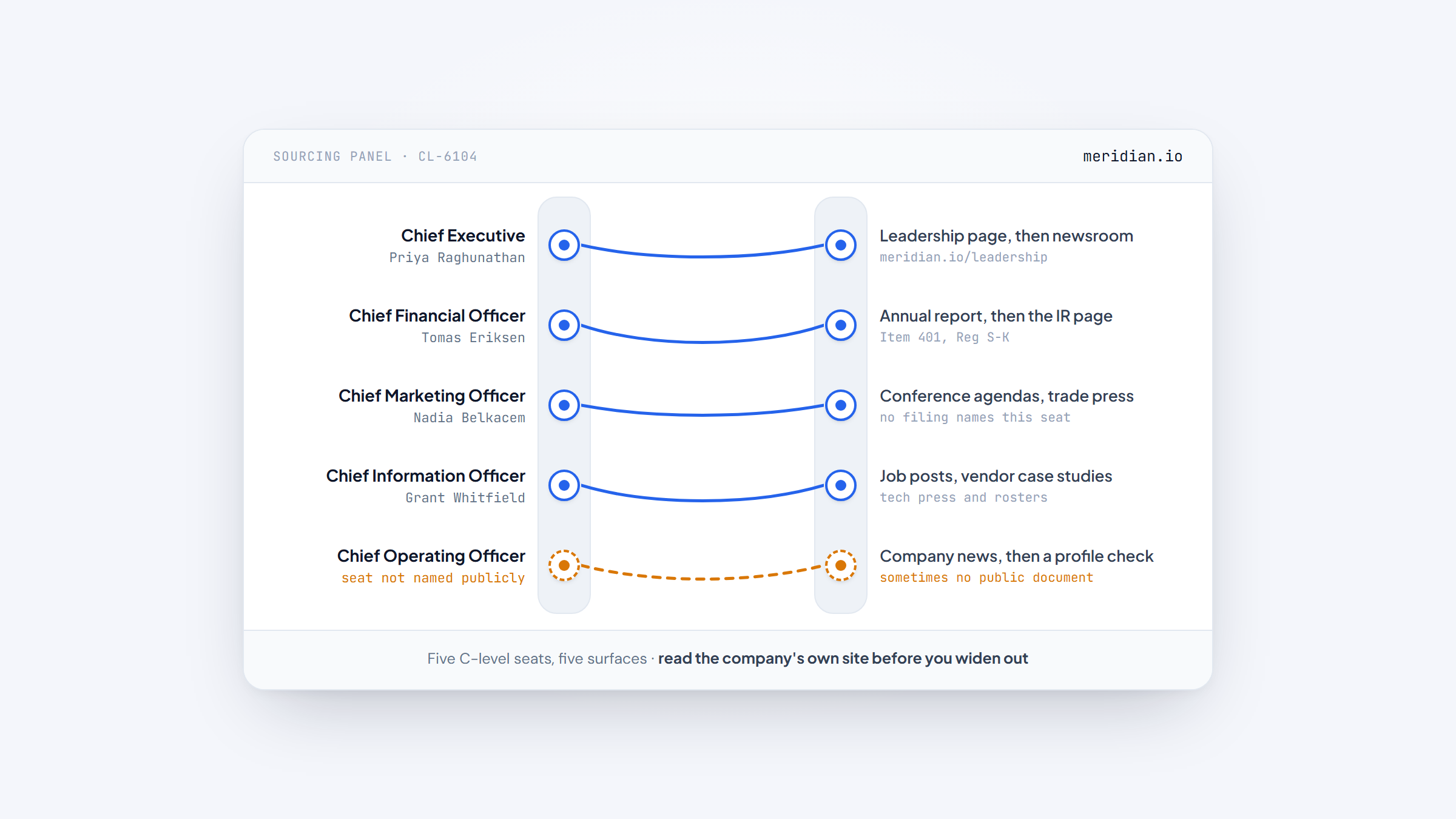
- 1"C-level" is one label across several jobs, and those jobs leave very different public trails, so a single file is the wrong unit for a C-suite campaign.
- 2A C-suite purchase is a committee decision: Forrester counts 13 internal stakeholders and nine external influencers behind the typical buying decision.
- 3Source each seat on its own route, the CFO from filings, the CEO from the company's own pages and press, the marketing seat from campaigns and conferences.
- 4Confirm every name and address before you send, because a seat can change hands without any public signal.
A c level executives email list sounds like one download. In practice it is a research habit run across a buying committee, because "C-level" is a nickname for several jobs that behave nothing alike once you try to reach them.
The chief financial officer appears in public filings on a schedule. The chief marketing officer usually does not. A founder answers their own inbox while a Fortune 500 chief executive has an assistant deciding what reaches the desk. One file, one filter and one template cannot cover all of that, which is why an email list of C-level executives built that way goes stale and bounces.
This guide works in the order a deal actually arrives. Map the committee first, source each seat from the surface where its name is public, then confirm the address before anything leaves your outbox. The address is the one step we build a tool for, and it is a finder rather than a list, for reasons we set out below.
Why C-Level Is a Buying Committee, Not a Title
The unit of a C-suite sale is a panel, not a person. Forrester's 2026 report found that the typical buying decision now involves 13 internal stakeholders and nine external influencers, and the group grows with the size and risk of the purchase. Procurement alone is a decision-maker in 53% of buying cycles.
Large groups are not a problem to route around. Forrester also found that 94% of buyers in groups of six or more report clear benefits, from broader perspectives to a better chance of securing budget. The committee is where a deal is decided, not a hurdle before it.
That reframes the whole exercise. A file filtered to one title gives you one seat at a table that seats a dozen, and it tells you nothing about who else signs, blocks or stalls the decision. You are not filling a list. You are mapping a room.
The Same C-Level Title Means Different People by Role
Two people both called C-level can be nothing alike in how an outsider finds them, because the roles leave different paper trails. The SEC's own definition of an executive officer covers the president, any vice president in charge of a principal function "such as sales, administration or finance," and anyone performing a policy-making function (17 CFR 240.3b-7).
Finance leadership sits inside that definition, and that matters for sourcing. A public company must list the names and positions of its executive officers in its annual report, a requirement set out in Item 401 of Regulation S-K (17 CFR 229.401).
Marketing leadership often falls outside the roster, so the same label can be a documented public fact for one seat and a press-release mention for another. The CFO list guide works the filing route in full.
The sourcing route follows from that gap, and it changes seat by seat.
Role | Where the name is usually public | Who gatekeeps the inbox | Best sourcing route |
|---|---|---|---|
CEO | Leadership page, press, award lists | Executive assistant, communications | Company site, then newsroom |
CFO | Annual report, proxy, earnings coverage | Investor relations, assistant | Filings, then IR page |
CMO | Campaign pages, conference agendas, trade press | Marketing ops, assistant | Trade press and events |
CIO or CTO | Job posts, vendor case studies, tech press | IT leadership, procurement | Tech signals and press |
COO | Org news, press, sometimes nothing | Chief of staff, operations | Company news, then a profile check |
Treat the table as a starting point rather than a rule. Smaller companies publish less and hide less, while a large one can name its CFO three times a year and its CMO nowhere at all. Every cell is a hypothesis you confirm for the specific company in front of you.
Map the Committee Before You Look for an Address
Decide which seats matter before you spend any time on addresses, because the committee defines the list. Working one account at a time, the map has five roles worth naming.
- The economic buyer who can release budget, often the CFO or a divisional head.
- The champion who feels the problem and wants it fixed, often a director or a vice president.
- The technical evaluator who tests fit, usually IT or security.
- The blocker who can stop the deal, most often finance, legal or procurement.
- The end user whose working day the purchase changes, and whose objection travels furthest.
You rarely reach all five, and you do not need to. Naming them first tells you which addresses are worth finding and which are noise.
One widely read thread in r/sales makes the point from the seller's side. Reps chase decision-makers and skip the people who influence the decision, yet those influencers are often the easier first conversation. The lesson is not to ignore the top of the org chart. It is to treat the committee, not the title, as the target.
This is where a finder earns its place early. Once you have five names you actually want, you still need five addresses, and finding them one at a time is the job our extension does inside Gmail.
Source Each C-Level Seat from the Surface That Publishes It
The committee map tells you who, and the role tells you where. Each seat has one or two surfaces that publish its name before you ever look for an address, and the order you check them in saves most of the work.
The CFO, from Filings
Public companies name their financial leadership in the annual report and the proxy statement, and earnings coverage repeats the name each quarter. Start with the investor relations page, then read the most recent filing for the current holder.
Private companies have no filing duty, so the name comes from the company's own pages, a funding announcement, or the person's own professional profile. Confirm the current holder rather than the one you remember, because this seat changes hands more often than the title suggests.
The CEO, from the Company's Own Pages and Press
The chief executive is the most publicly identified seat at nearly every company. A leadership page names the holder, the newsroom carries the appointment, and trade press repeats it. The harder case is a private mid-market firm that never announces a change, so cross-check the newsroom against the person's own profile before you trust that the seat is current.
The CMO, from Campaigns, Conferences and Award Lists
Marketing leadership is the seat most likely to be missing from filings and present everywhere else. Campaign and product pages carry the name, conference agendas list the speaker, and marketing trade press reports appointments. The acronym is also a real trap, since CMO stands for chief medical officer just as often in healthcare, a split we work through in the CMO list guide.
The CIO, CTO and COO, from Signals and News
Technology leadership shows up in job posts for their teams, in vendor case studies and on technical conference rosters. The chief operating officer is the most variable of the group, sometimes announced in a press release and sometimes absent from every public document, so treat news plus a profile check as the route.
Reading each company's own site before you widen out is the habit that keeps all four routes honest.
Match the Route to Company Size
Headcount decides which C-level seats even exist and how easily a name surfaces. A 30-person firm may have one person wearing three of these titles, while a 30,000-person firm has each seat filled and a gatekeeper in front of every one.
Company size | Which C-level seats exist | Where names appear | Route that works |
|---|---|---|---|
0-50 employees | Founder plus one or two generalist leaders | Company site, founder interviews | Write to the person directly |
51-500 employees | CEO, CFO, one or two functional VPs | Leadership page, press, funding news | Person's address, or a routed ask |
501-5,000 employees | Full C-suite, some seats combined | Leadership page, filings, trade press | Role guide, then confirmation |
5,000+ employees | A named officer for each function | Annual report, IR page, press desk | Filings and IR, then gatekeeper |
At the small end the "list" is close to a warm market, because the titles collapse into a handful of people you can name in an afternoon. At the large end, plan for a longer sequence and a gatekeeper, and lean on the surfaces that a public company is obliged to keep current.
Whichever band you are in, the rule is the same. Match the research route to the size, then stop guessing once a public surface has given you the name.
Where a C-Level Name Is Public for Free
Most of the committee is discoverable without paying anyone, which makes a bought file a convenience rather than a necessity. Company leadership pages, newsrooms, filings and trade press cover the named seats at public companies, and the company-page habits behind that work are set out in company research tools.
For private firms, the trail is thinner but still there. Funding announcements name the executives who raised, product launches quote the leaders behind them, and conference rosters list the speakers. A profile check closes the loop when the company itself says nothing.
The trick is to read each source for what it actually proves. A leadership page proves the company presents someone as its officer, a filing proves the company is required to name them, and a conference bio proves the person speaks publicly. None of them proves the address, which is the only thing left to obtain.
What C Level Executives Email List Providers Actually Charge
A ready-made C-level executives email list is a real product, and the differences between vendors matter more than the row counts. Some publish a price, some publish a count, and the two rarely line up. The table shows what each one charges and what it actually states about C-level contacts.
Vendor | What it sells | Price (from) | Publishes a C-level count? |
|---|---|---|---|
Reply.io | Platform with a bundled database | $59/user/mo | No C-level count; 1B+ contacts bundled in the platform |
BookYourData | Pay-as-you-go contact database | 10 free credits, then $99 for 250 credits | 4,487,446 C-level contacts |
Avention Media | Role-based contact database | Quote only | 3.97M+ C-level contacts |
Blue Mail Media | Role-based contact database | Quote only | 8M+ C-level executive records |
InfoGlobalData | Job-title contact database | Quote only | 1.5M+ on its CEO list (no C-suite total) |
DataCaptive | Role-based contact database | Quote only | No C-level count published |
Reply.io builds Name2Email, so its place at the top of this table is disclosed rather than hidden. Its platform bundles a contact database of more than a billion records, which the company does not sell as a standalone file, and buyers get a 14-day trial in place of a free plan. The delivery and bounce numbers are self-reported, and no C-level count is published.
The rest of the field splits the same way. BookYourData is the only vendor here showing per-credit pricing, at $0.40 a contact on the entry pack, while the other four keep a quote behind a request. Their counts for one label run from 1.5 million to 8 million, a fivefold spread that no shared definition explains.
Not one of them publishes how many C-level executives actually exist, so test any count against a free sample instead of planning around it.
Why a File You Buy Today Is Wrong by Spring
Buy a C-level file and it begins to age on the day it leaves the vendor, because the seats move and the labels blur. Executives change roles without any public clock, and the acronyms themselves do not stay still.
The title sprawl is visible in the vendors' own catalogs. Many split the category into a long menu of separate lists, and one acronym can hide two different jobs: a chief revenue officer list and a chief risk officer list sit under the same letters. A filter that matches the letters without checking the meaning will hand you the wrong executive.
Seat churn compounds it. A chief financial officer who departed in March can still appear in a file shipped in September with no outward sign, because the record carries no expiry date the way a license does. When you weigh two files, the useful question is how the vendor hears about a departure, not how many rows each one claims.
Build It Yourself: From Account to Panel
The whole method runs in one order, starting from a target account and ending with a set of names you can defend. Done by hand, it takes about half an hour per account and produces a list you can actually use.
- Pick the target account and note its size, which decides which C-level seats exist.
- Read the leadership page to get the current holders of those seats.
- Check the newsroom and filings for a change the leadership page has not caught up with.
- Name the committee roles for your offer, the buyer, the champion, the blocker and the user.
- Build one candidate address per name from the domain's pattern, then confirm it.
- Record the source for each name, so a later check can tell what has gone stale.
The order matters more than any single step. Deciding the committee before you hunt for addresses keeps the list small, and recording your sources is what lets you re-verify the file next quarter instead of rebuilding it from scratch.
Turn a Confirmed Name Into an Address
Candidate addresses come from one habit: learn how a company builds an address, then apply that shape to the name you confirmed. The convention is a habit rather than a rule, so every result stays a guess until it answers.
Work down this order until one produces a match.
- first@domain.com, typical of small and owner-run companies.
- first.last@domain.com, the default at most larger firms.
- f.last@domain.com, common where finance, legal or consulting leads the domain.
- firstlast@domain.com, no separator, still in wide use.
- last@domain.com, occasional at very small companies.
You are not guessing in the dark. Any address you can confirm at the company, even one for a junior employee, teaches you the shape everyone else follows.
Two traps are worth knowing. Executives are the people most likely to break the company convention, often sitting on a firstname@domain address that no pattern predicts, and a borrowed shape is evidence rather than proof. When the usual formats all fail, a wider set of email finding tools is the usual next stop.
Confirm the Address Before the Message Leaves
Guessing at an address is not a plan, because a bounce costs more than the minute a check takes, and a streak of them changes how mailbox providers treat your domain.
Gmail offers the confirmation for free. Drop the candidate into a new message's To: field and hold the pointer over it. If Gmail recognizes the address, the contact card fills with the person's name and a photo, which tells you the format is right, while a blank card sends you to the next pattern.
The card is a check, not a guarantee. Make sure the name is the person you intended and not a colleague who shares a surname, and make sure the domain belongs to the company rather than a personal inbox.
One message at a time, the hover is enough. Confirm a whole panel of addresses in a batch once the list grows, a job how to verify an address handles beyond a single hover.
Find the Address Without Leaving Gmail
The last step is the address, and it is the one we build for. Name2Email is our free Chrome extension, made by the team at Reply.io, and it turns a confirmed name into a work email without leaving the message you are writing.
Enter a name plus the company's domain, and likely formats land in the To: field. Hold the pointer over each one and the correct address identifies itself through the person's name and photo. There is no second tab to open and nothing to paste back. The how it works walkthrough covers it in about a minute.
We are straight about the weak spots. The addresses come from public naming conventions instead of stored records, so a company domain is where we do best and a personal mailbox is where we do not, and an executive on a one-off format may fall outside every pattern we try. For that person, the company's own pages are still the better source.
We are not a list vendor either. Name2Email holds no database and builds no file. It works on one name at a time, the one you just confirmed, with nothing to sign up for and no credits to spend.
Build the Panel from Names You Can Confirm
A c level executives email list is not something you download and send. Build it as a panel: pick the seats that matter, confirm each name where it is public, and test each address before you write.
Keep to that sequence and the file stays short and usable. The committee decides who belongs on it, the role decides where the name is found, and the confirmation step stops a guess from becoming a bounce. A paid route adds convenience and volume, a difference the paid finder comparison lays out plainly.
Name2Email closes the loop where you already work. Map the committee from public sources, then let our extension settle the addresses inside the draft. It costs nothing, skips the signup, and works best on a company domain. Add to Chrome and run the next name on your panel.
Frequently asked questions
You assemble it rather than download it, because no register lists every C-suite officer. Begin with the leadership page for the names, the newsroom for a current appointment, and a filing if the company is public. The free surfaces cover the discovery, and the address is a confirmation job from there. If you want a ready-made file, the providers in this guide publish samples you can test before you buy.
It is free at the bottom and a few hundred dollars a month at the top. BookYourData charges $99 for its first 250 credits, about $0.40 a contact, and the four quote-only vendors in this guide keep their rates behind a request. Building the list yourself from public sources costs nothing but time, and it keeps the file current.
There is no free, complete list, and a claim that promises one deserves a closer look. The free path is to name the seats from leadership pages, press and filings, then find each address. Our extension generates and confirms addresses in Gmail for nothing, and BookYourData starts with ten free credits if you want to compare a purchased record against your own research.
The committee is what changes. A general B2B list assumes one contact per account, while an email list of C-level executives has to reach several seats that decide together, and those seats are sourced from different places. A CFO comes from a filing and a CMO from a conference, so one filter cannot cover both.
Two reasons. The seats change hands without a public clock, and the acronyms do not stay still, so a filter can match the letters without matching the role. One vendor sells three separate lists under one acronym, which is why a file that looked current on export can carry the wrong executive by the next quarter.

We build Name2Email, the free Chrome extension that finds work emails inside Gmail. We write about outreach, prospecting, and getting more replies.
Connect →